
What Do Chart Timeframes Mean in Trading? M1 to MN1 Explained
A chart timeframe is the time each candle covers, so each H1 candle shows one hour of price and each D1 candle shows one day. Changing the timeframe changes the detail you see, never what the market did.
Module 4 · Lesson 2 of 5
What you'll learn
- What a chart timeframe is and how MetaTrader 5 names each one.
- How twelve 5-minute candles combine into one 1-hour candle.
- How the same prices look on M5, H1 and D1, and why candle size matters for risk.
- How to change the timeframe in MetaTrader 5, and why daily candles follow server time.
Part of the Reading Price Charts module. If open, high, low and close are new to you, start with candlestick anatomy.
What does a chart timeframe mean in trading?
A chart timeframe is the length of time that each candle or bar on a price chart covers. On a 1-hour chart, each candle sums up one hour: the open, the high, the low and the close. MetaQuotes' help defines a timeframe as the time of one bar or candlestick.
Changing the timeframe changes the view, not the market: it cuts the same price history into many small candles or a few big ones.
Timeframe names in MetaTrader 5
M means minutes and H hours, so M15 is 15 minutes and H4 is 4 hours. D1 is one day, W1 one week and MN1 one month. The platform offers 21 timeframes from one minute (M1) to one month (MN1).
What are the most common chart timeframes?
The most common chart timeframes are M1, M5, M15, M30, H1, H4, D1, W1 and MN1. The counts assume a market open 24 hours, five days a week, as major currency pairs are; a daily break lowers them slightly. The last column follows the MetaTrader 5 help on charts.
| Code | One candle equals | Candles in a 24-hour day | Candles in a 5-day week | Typical use (MT5 help) |
|---|---|---|---|---|
| M1 | 1 minute | 1,440 | 7,200 | Short-term scalping |
| M5 | 5 minutes | 288 | 1,440 | Short-term scalping |
| M15 | 15 minutes | 96 | 480 | Short-term scalping |
| M30 | 30 minutes | 48 | 240 | Intraday trading |
| H1 | 1 hour | 24 | 120 | Intraday trading |
| H4 | 4 hours | 6 | 30 | Intraday trading |
| D1 | 1 day | 1 | 5 | Longer-term trends |
| W1 | 1 week | Part of one | 1 | Longer-term trends |
| MN1 | 1 month | Part of one | Part of one | Longer-term trends |
Scalping means trades lasting minutes. Intraday trading means opening and closing within the same day.
How do lower timeframes build higher timeframes?
Every higher-timeframe candle is built from the smaller candles inside it. Its open is the first small candle's open, its close is the last one's close, its high is the highest high and its low is the lowest low. MetaTrader 5 stores only 1-minute bars and builds every higher timeframe from them.
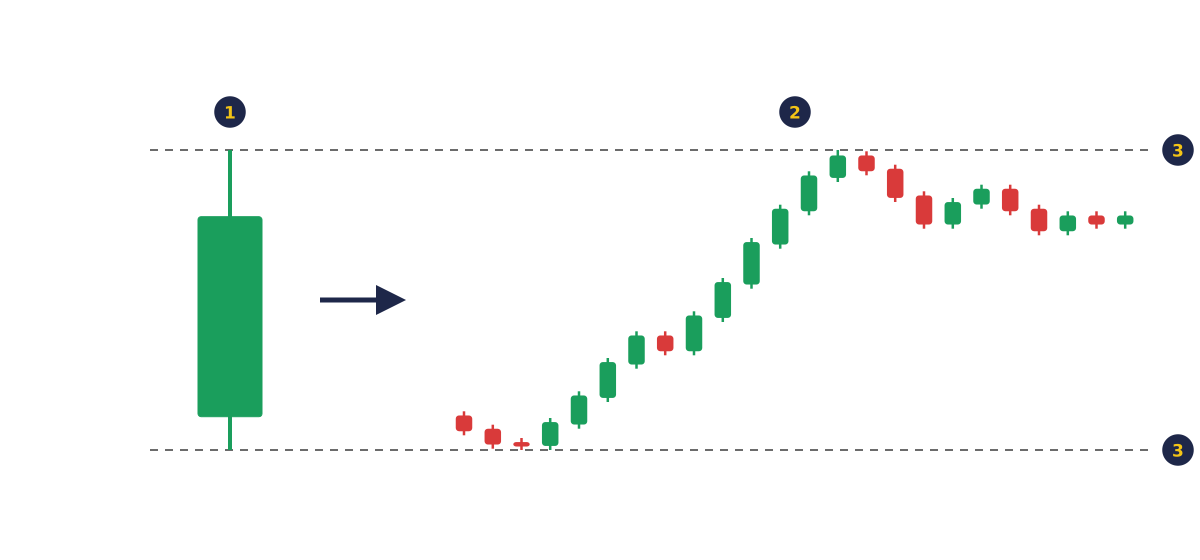
- One D1 candle: the whole day in a single shape.
- The same day as 24 H1 candles.
- Both views share exactly the same high and low.
Worked example: twelve M5 candles make one H1 candle
Synthetic EURUSD prices for one hour, 10:00 to 11:00, on M5:
| M5 candle | Open | High | Low | Close |
|---|---|---|---|---|
| 10:00 | 1.10000 | 1.10020 | 1.09980 | 1.09990 |
| 10:05 | 1.09990 | 1.10000 | 1.09960 | 1.09965 |
| 10:10 | 1.09965 | 1.09975 | 1.09935 | 1.09940 |
| 10:15 | 1.09940 | 1.09955 | 1.09920 | 1.09950 |
| 10:20 | 1.09950 | 1.09985 | 1.09945 | 1.09980 |
| 10:25 | 1.09980 | 1.10010 | 1.09970 | 1.10005 |
| 10:30 | 1.10005 | 1.10040 | 1.10000 | 1.10035 |
| 10:35 | 1.10035 | 1.10070 | 1.10030 | 1.10060 |
| 10:40 | 1.10060 | 1.10095 | 1.10055 | 1.10090 |
| 10:45 | 1.10090 | 1.10120 | 1.10080 | 1.10110 |
| 10:50 | 1.10110 | 1.10115 | 1.10075 | 1.10085 |
| 10:55 | 1.10085 | 1.10095 | 1.10060 | 1.10080 |
The 10:00 H1 candle is read straight from that table:
- Open 1.10000, the open of the 10:00 candle.
- High 1.10120, the highest high, reached at 10:45.
- Low 1.09920, the lowest low, reached at 10:15.
- Close 1.10080, the close of the 10:55 candle.
M5 shows an 8-pip dip, then a climb. H1 shows one green candle with a lower wick. Same prices, less detail.
Why does the size of a candle matter for risk?
Candle size matters because ranges grow on higher timeframes, and a stop-loss placed around a candle's range risks money in proportion to that range. In the example, each M5 candle spans about 4 pips. The H1 candle spans 20 pips, from 1.09920 to 1.10120.
At 0.10 lot of EURUSD, one pip is worth about $1 (see lots, pips and pip value):
| Stop distance based on | Distance | Money at risk on 0.10 lot |
|---|---|---|
| One M5 candle's range | 4 pips | about $4 |
| One H1 candle's range | 20 pips | about $20 |
The pip value calculator handles other pairs and sizes, and stop placement is explained in stop-loss and take-profit.
How does the same price action look on M5, H1 and D1?
The same price action looks busy on M5, steadier on H1 and like a single shape on D1. Lower timeframes show more detail and more noise, meaning small moves that may not matter for the bigger picture. Higher timeframes show less detail and change slowly.
| M5 | H1 | D1 | |
|---|---|---|---|
| Candles for one trading day | 288 | 24 | 1 |
| A sharp dip and recovery looks like | A steep slide, a pause, a climb back | A few candles with long wicks | One candle with a long lower wick |
Both views are correct. M5 shows how the move unfolded; D1 shows where the day finished.
How do traders choose a chart timeframe?
Traders usually match the timeframe to how long they plan to hold a trade and how often they can watch the screen. Lower timeframes form new candles fast, so they suit styles that watch constantly. Higher timeframes change slowly and suit people who check charts less often. Each side has trade-offs:
| Lower (M1 to M15) | Higher (D1 to MN1) | |
|---|---|---|
| New candles | Many: M5 adds 12 an hour | Few: D1 adds one a day |
| Screen time needed | High | Low |
| Noise | More | Less |
| Candle range, so stop distance | Small | Large |
| Spread as a share of one candle | Larger | Smaller |
Swing trading means holding trades for days to weeks; position trading, for weeks to months. Trading and investing are compared in trading vs investing. Reading several timeframes together, known as multi-timeframe analysis, is covered in Module 13, Advanced Strategy.
Why does a daily candle depend on your broker's server time?
A D1 candle covers one day on your broker's server clock, not on your own clock. MetaTrader 5 shows quote times in the time zone of the broker's trading server, and every timeframe is built from those time-stamped 1-minute bars.
So a daily candle may start in the late evening or early morning on your own clock. Two brokers on different server time zones can show different daily candles for the same market. Session timing is covered in forex market sessions.
How do you change the timeframe in MetaTrader 5?
To change the timeframe of any open chart in MetaTrader 5, click a button on the Timeframes toolbar, or choose a timeframe from the Charts menu or the chart's right-click menu. All three routes are described in the MetaTrader 5 help on charts.
- Open a chart by dragging a symbol from Market Watch onto the chart area.
- Click a timeframe button such as H1 on the Timeframes toolbar.
- Check the line at the top of the chart showing the symbol and timeframe.
New to the layout? See the MetaTrader 5 platform tour.
What do skilled traders watch for when reading timeframes?
Skilled traders separate noise from real moves, check the spread against a candle's range, and manage each trade on the timeframe they planned it on. These three habits keep both the reading of the market and the cost of each trade accurate, whichever timeframe you choose to trade.
- Noise. On M1 or M5 a few pips can look dramatic; on D1 the same move may be invisible.
- Costs. A 2-pip spread, for example, is half a 4-pip M5 range but a tenth of a 20-pip H1 range (see spread, commission and swap).
- One timeframe per trade. A lower timeframe makes normal swings look large; a higher one makes a loss look small. Stay on the one you planned with.
Position sizing is covered in Module 5, Risk Management.
Try it on demo
On a MetaTrader 5 demo account, open a EURUSD chart and switch between M5, H1 and D1, writing one sentence on what each view suggests. Then use the Data Window (Ctrl+D) to read one H1 candle's open, high, low and close, and compare them with the M5 candles inside that hour.
Quick check
- On an H1 chart, each candle shows
- How many M5 candles make up one H1 candle?
- The high of an H1 candle is
- Compared with a D1 chart, an M5 chart generally shows
- At 0.10 lot of EURUSD (about $1 per pip), a stop 20 pips away risks about
Frequently asked questions
What is the best timeframe for beginners?
Match the timeframe to your schedule. H1, H4 and D1 suit beginners who cannot watch the screen all day, because new candles form slowly and there is less noise; M1 to M15 need constant screen time. Practise on a demo account first.
Which timeframe is the most accurate?
Every timeframe is equally accurate. MetaTrader 5 builds every timeframe from the same 1-minute bars, so each one shows the same prices in more or less detail.
What does H1 mean in trading?
H1 means a 1-hour timeframe, so each candle on the chart shows one hour of price: its open, high, low and close. H4 is 4 hours, M15 is 15 minutes and D1 is one day.
How many timeframes are there in MT5?
MetaTrader 5 has 21 timeframes, from M1 (one minute) to MN1 (one month). The MQL5 Reference lists them: M1, M2, M3, M4, M5, M6, M10, M12, M15, M20, M30, H1, H2, H3, H4, H6, H8, H12, D1, W1 and MN1.
Sources
- MetaQuotes, MetaTrader 5 Help: View and Configure Charts, accessed 19 October 2026: a timeframe is the time of one bar or candlestick; there are 21 timeframes from one minute to one month; timeframes can be changed with the Timeframes toolbar, the Charts menu and the chart's context menu; M1 to M15 are used for short-term scalping, M30 to H4 for intraday trading and higher timeframes for longer-term trends. https://www.metatrader5.com/en/terminal/help/charts_analysis/charts
- MetaQuotes, MetaTrader 5 Help: User Interface, accessed 19 October 2026: every chart can display 21 timeframes from one minute (M1) to one month (MN1). https://www.metatrader5.com/en/terminal/help/startworking/interface
- MetaQuotes, MetaTrader 5 Help: Price Data, accessed 19 October 2026: the platform stores only 1-minute bars and creates all higher timeframes from them. https://www.metatrader5.com/en/terminal/help/trading_advanced/price_data
- MetaQuotes, MetaTrader 5 Help: Market Watch, accessed 19 October 2026: quote arrival times are given in the time zone of the broker's trading server. https://www.metatrader5.com/en/terminal/help/trading/market_watch
- MetaQuotes, MQL5 Reference: Chart Timeframes (ENUM_TIMEFRAMES), accessed 19 October 2026: the full list of 21 timeframes from M1 to MN1. https://www.mql5.com/en/docs/constants/chartconstants/enum_timeframes
Practise what you learned
Open an account to use MetaTrader 5. Start on a demo account before risking real money.
Open Account