
Position Sizing in Forex: The Fixed-Percentage Risk Method
Position sizing in forex is working out how many lots to trade so that, if your stop loss is hit, you lose only the amount you chose to risk. The formula is lots = (account × risk %) ÷ (stop distance in pips × pip value per lot).
Module 5 · Lesson 2 of 5
What you'll learn
- What position sizing is and why the size comes last, after the stop loss.
- How the fixed-percentage method compares with fixed lots and fixed amounts.
- How to calculate a position size from your risk and stop distance.
- Why you round down, how to size non-USD pairs and how to check margin.
What is position sizing in forex?
Position sizing in forex is choosing how many lots to trade so that, if your stop loss is hit, the loss equals an amount you decided in advance. You set the money at risk and the stop level first. The lot size is then worked out from those two numbers, not picked because it feels right.
Two traders can take the same trade and lose very different amounts only because they chose different sizes. This lesson, part of Module 5, Risk Management, makes that choice deliberate. The same method sizes other CFDs, such as indices; only the value of each price step differs.
Definitions
- Risk per trade: the money you accept losing on one trade if the stop loss is hit.
- Stop distance: how far, in pips, your stop loss sits from your entry. See the stop loss and take profit lesson.
- Pip value per lot: what a one-pip move is worth on 1.00 lot, explained in the lots, pips and pip value lesson.
- Lot: the unit of trade size; see our guide to forex lot sizes.
How does the fixed-percentage risk method work?
The fixed-percentage risk method means risking the same percentage of your account balance on every trade, so the money at risk is always a set share of what you have. It is the method this course uses. You choose the percentage; the method only makes sure you apply it the same way every time.
1% is used here because it keeps the arithmetic easy. Doubling the percentage doubles the size and the loss at the stop. Because the amount is a percentage, it also follows the account: if the balance falls to $4,500, 1% becomes $45 and the next position is smaller.
Compared with two other common methods:
| Method | What stays the same | What the loss at the stop does |
|---|---|---|
| Fixed lot | The lot size | Grows with a wider stop |
| Fixed money amount | The money at risk | Stays the same as the balance changes |
| Fixed percentage | The share of the balance at risk | Shrinks after losses and grows after gains |
How do you calculate position size in forex?
Position size in lots = (account balance × risk %) ÷ (stop distance in pips × pip value per lot). The top of the formula is the money you accept losing. The bottom is what your stop would cost on 1.00 lot. Dividing one by the other gives the number of lots that fits your risk.
- Money at risk = account balance × risk % ÷ 100.
- Set your stop loss on the chart and measure the stop distance in pips.
- Find the pip value per lot: contract size × pip size, converted into your account currency if needed.
- Lots = money at risk ÷ (stop distance × pip value per lot).
- Round down to your platform's volume step.
The position size calculator runs these steps, including the rounding. Learn them first so you can check its answer.
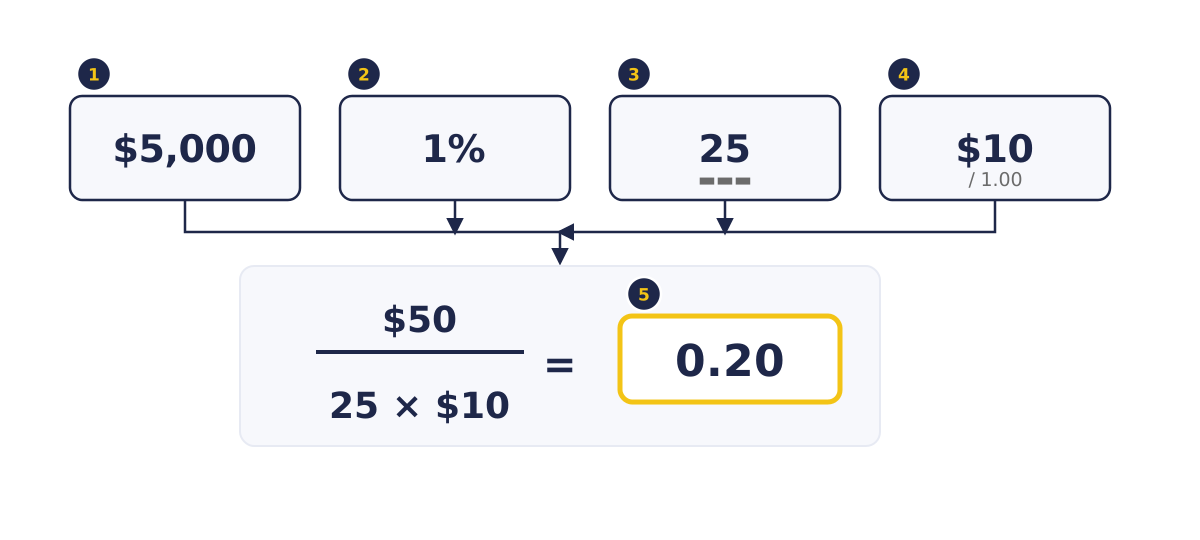
- Boxes 1 and 2: a $5,000 account and 1% risk give $50 at risk.
- Boxes 3 and 4: a 25-pip stop on EURUSD, where 1.00 lot is worth $10 per pip.
- Box 5: $50 ÷ (25 × $10) = 0.20 lot, so each pip is $2 and the stop costs $50.
What is a worked example of position sizing?
On a $5,000 account risking 1% with a 40-pip stop on EURUSD, the formula gives 0.125 lot, which you round down to 0.12 lot, so the real risk is $48. The working is below, using synthetic figures and a pip value of $10 per lot, which applies to currency pairs quoted in US dollars in a USD account.
| Step | Calculation | Result |
|---|---|---|
| Money at risk | $5,000 × 1 ÷ 100 | $50 |
| Cost of the stop on 1.00 lot | 40 pips × $10 | $400 |
| Position size | $50 ÷ $400 | 0.125 lot |
| Rounded down to a 0.01 step | 0.125 → 0.12 | 0.12 lot |
| Real loss if the stop is hit | 0.12 × $10 × 40 | $48 |
Rounding up to 0.13 lot would risk $52, more than you planned.
In any account currency the same stop again gives 0.
How does stop distance change position size?
For the same money at risk, a wider stop means a smaller position and a tighter stop means a larger one, so the loss at the stop stays the same. The stop goes where your trade idea is proven wrong, and the size adjusts to fit it. Never move the stop just to trade a bigger size.
A $1,000 account risking 1%, which is $10, on EURUSD at $10 per pip per lot:
| Stop distance | Position size | Loss if the stop is hit |
|---|---|---|
| 10 pips | 0.10 lot | $10 |
| 20 pips | 0.05 lot | $10 |
| 25 pips | 0.04 lot | $10 |
| 50 pips | 0.02 lot | $10 |
| 200 pips | 0.005 lot, below 0.01 | Cannot be sized to $10 |
If the result is below the smallest size you can trade, the trade cannot be sized to your risk: 0.01 lot would risk $20, not $10.
Why do you round down to the volume step?
You round down because the platform only accepts sizes in fixed steps, and rounding down is the only direction that never risks more than you chose. MetaTrader 5 shows each symbol's minimal volume, maximal volume and volume step in its contract specification, so check them there.
A minimum of 0.01 lot and a step of 0.01 are common, but not fixed: MetaQuotes notes that the minimum volume and its change step are limited by the brokerage company. If your result is below the minimal volume, skip the trade rather than rounding up.
How do you size a pair not quoted in US dollars?
When the quote currency, the second currency in the pair, differs from your account currency, the pip value per lot is converted at the current rate, so it is not $10. The formula stays the same. Only the pip value you put into it changes, and it moves with the exchange rate.
On USDJPY, 1 lot is 100,000 units and a pip is 0.01, so a pip is worth ¥1,000 per lot. At an illustrative USDJPY rate of 150.00, that is about $6.67 per pip. With the same $5,000 account, 1% risk and 40-pip stop: $50 ÷ (40 × $6.67) = 0.1875, rounded down to 0.18 lot, which risks $48. The pip value calculator does the conversion.
How do you check margin before opening the position?
After sizing, check that the position's required margin fits comfortably inside your free margin, because risk and margin answer different questions. Position size sets how much you lose at the stop. Leverage only sets how much margin the position ties up while it is open, as the leverage and margin lesson explains.
The 0.12 lot of EURUSD from the worked example, at an illustrative 1.1000, is a $13,200 position. At an illustrative 1:30 it needs $440 of margin; at 1:100, $132. The loss at the stop is $48 either way. Use the margin calculator and compare its result with your free margin in MetaTrader 5.
What can make the real loss differ from the planned loss?
The real loss can differ from the planned amount when a stop fills past its level, when costs are added, when an input is wrong, or when several open trades hit their stops together. The formula assumes your stop fills at its exact price and every input is correct, so skilled traders allow for each of these.
- Gaps and slippage: after news or over a weekend, price can jump past your stop, so the stop fills at the next available price. Allow for this when holding through major releases.
- Costs: spread, commission and swap are not in the formula. See the spread, commission and swap lesson.
- Wrong inputs: a wrong pip value or out-of-date exchange rate gives a wrong size, so check the calculator's answer against your own sum.
- Several open trades: each trade's risk adds up, and pairs that tend to move together can all hit their stops at once, so count total open risk.
Size controls how much you lose at the stop. Whether a trade is worth taking is the next lesson, on the risk to reward ratio. Automatic closing when equity runs low is covered in the margin call and stop-out lesson.
Try it on demo
On a demo account in MetaTrader 5, mark a stop loss level on a EURUSD chart and count the pips from your planned entry. Work out the lot size by hand from your demo balance and a risk percentage you choose, then check it with the position size calculator. Open the trade at that size with the stop attached.
Quick check
- Position sizing starts from
- A $5,000 account risks 1% with a 25-pip stop on EURUSD at $10 per pip per lot. The position size is
- The stop widens from 25 to 50 pips and the risk amount stays the same. The position size
- The formula gives 0.125 lot and the volume step is 0.01. Which size keeps you within your risk?
- In a USD account, the pip value per lot of USDJPY
Frequently asked questions
What is the 1% rule in forex?
It is a position sizing rule: risk no more than 1% of the account balance on any one trade, so a $5,000 account risks at most $50. This module uses 1% in its examples because it keeps the arithmetic easy.
How many lots should I trade with a $1,000 account?
It depends on your risk and stop, because the lot size comes from the amount you choose to risk and your stop distance, not the balance alone. Risking $10 on EURUSD gives 0.05 lot with a 20-pip stop and 0.02 lot with a 50-pip stop.
Does position sizing include spread and commission?
No. The formula covers only the price distance to your stop, so spread, commission and swap can make a stopped-out loss slightly larger than planned.
What if my position size is below the minimum lot size?
Then you cannot size that trade to your chosen risk, because the smallest allowed position would lose more than you planned. Skip it rather than rounding up or tightening the stop just to fit.
Sources
- MetaQuotes, MetaTrader 5 Help: Market Watch (accessed 27 October 2026): a symbol's specification shows its contract size, minimal volume, maximal volume and volume step. https://www.metatrader5.com/en/terminal/help/trading/market_watch
- MetaQuotes, MetaTrader 5 Help: Executing Trades (accessed 27 October 2026): order volume is set in lots, and the minimum volume and its change step are limited by the brokerage company. https://www.metatrader5.com/en/terminal/help/trading/performing_deals
Practise what you learned
Open an account to use MetaTrader 5. Start on a demo account before risking real money.
Open Account