
Netting vs Hedging in MT5: What Is the Difference?
In MT5, netting merges trades on one symbol into one position, while hedging keeps each trade as its own position, so a buy and a sell can stay open. Your broker sets the mode for the whole account, so check it before you place a second trade.
Module 3 · Lesson 3 of 7
What you'll learn
- What netting and hedging mean in MetaTrader 5, and why the mode matters before your second trade.
- What happens in each mode when you buy 1.00 lot and then sell 0.40 lot of the same symbol.
- How the average open price is worked out when you add to a netting position.
- How margin and Expert Advisors are affected by the mode.
- How to check which mode your account uses, and what Close By does.
What is the difference between netting and hedging?
Netting vs hedging is about what MetaTrader 5 does with a second trade on the same symbol. Netting merges every deal into one position per symbol, so an opposite deal reduces or closes it. Hedging opens every deal as its own position, so you can hold several buys and sells on one symbol at once.
MetaQuotes, which makes MetaTrader 5, calls these two position accounting systems. Your broker sets one for the whole account, not trade by trade.
This lesson is part of the MetaTrader 5 Basics module. If buying and selling is new to you, read going long and short first.
Key terms
- Deal: one executed buy or sell.
- Position: what you hold after one or more deals. Its volume is measured in lots, as explained in our guide to forex lot sizes.
- Net exposure: your total buy volume minus your total sell volume on one symbol.
How does a netting account work?
In a netting account, a deal in the same direction adds to your one position, and an opposite deal reduces it, closes it or reverses it. It closes when the opposite deal is the same size. It reverses when the opposite deal is bigger than the position.
To close a netting position, you make an opposite deal of the same volume on the same symbol.
| You hold | New deal | Result in netting |
|---|---|---|
| 1.00 lot buy | Buy 0.50 lot | One 1.50 lot buy |
| 1.00 lot buy | Sell 0.40 lot | One 0.60 lot buy |
| 1.00 lot buy | Sell 1.00 lot | No position |
| 1.00 lot buy | Sell 1.50 lot | One 0.50 lot sell |
When a netting position grows or reverses, its Stop Loss and Take Profit follow the levels in the latest order, so check them after each deal.
How is a netting position's average price calculated?
When you add to a netting position, MetaTrader 5 recalculates its open price as a weighted average: each deal's price times its volume, added together, then divided by the total volume. Bigger deals pull the average further towards their price. MetaQuotes gives this formula in its help on performing trades.
Average open price = (price 1 × volume 1 + price 2 × volume 2) ÷ (volume 1 + volume 2)
Example with synthetic prices on EURUSD:
- You buy 1.00 lot at 1.10000.
- You buy 0.50 lot more at 1.10300.
- Average price = (1.10000 × 1.00 + 1.10300 × 0.50) ÷ 1.50 = (1.10000 + 0.55150) ÷ 1.50 = 1.10100.
You now hold one 1.50 lot buy at 1.10100. A hedging account would show two positions instead: 1.00 lot at 1.10000 and 0.50 lot at 1.10300.
How does a hedging account work?
In a hedging account, every new deal opens a new position and leaves your existing positions unchanged. You can hold several buys, several sells, or both, on the same symbol. Each position has its own ticket number, open price, Stop Loss and Take Profit, and you close each one on its own.
MetaQuotes added hedging to MetaTrader 5 in April 2016. A hedging position is never reversed by a new deal: if you sell more than you hold, the buy stays open unchanged and a separate sell opens.
What happens when you buy 1.00 lot and then sell 0.40 lot?
In a netting account you end up with one 0.60 lot buy position. In a hedging account you end up with two positions: a 1.00 lot buy and a 0.40 lot sell. In both modes your net exposure is the same, 0.60 lot long, so a price move changes your money by the same amount.
Worked example on EURUSD, where one standard lot is worth about $10 per pip. The price then falls 50 pips:
| Netting | Hedging | |
|---|---|---|
| Open positions | 1 (0.60 lot buy) | 2 (1.00 lot buy, 0.40 lot sell) |
| Net exposure | 0.60 lot long | 0.60 lot long |
| Effect of a 50-pip fall | 50 × $6 = −$300 | −$500 on the buy, +$200 on the sell = −$300 |
| Swap charged on | 0.60 lot | 1.00 lot (swap long) and 0.40 lot (swap short) |
The pip value calculator works out pip values for other pairs and sizes.
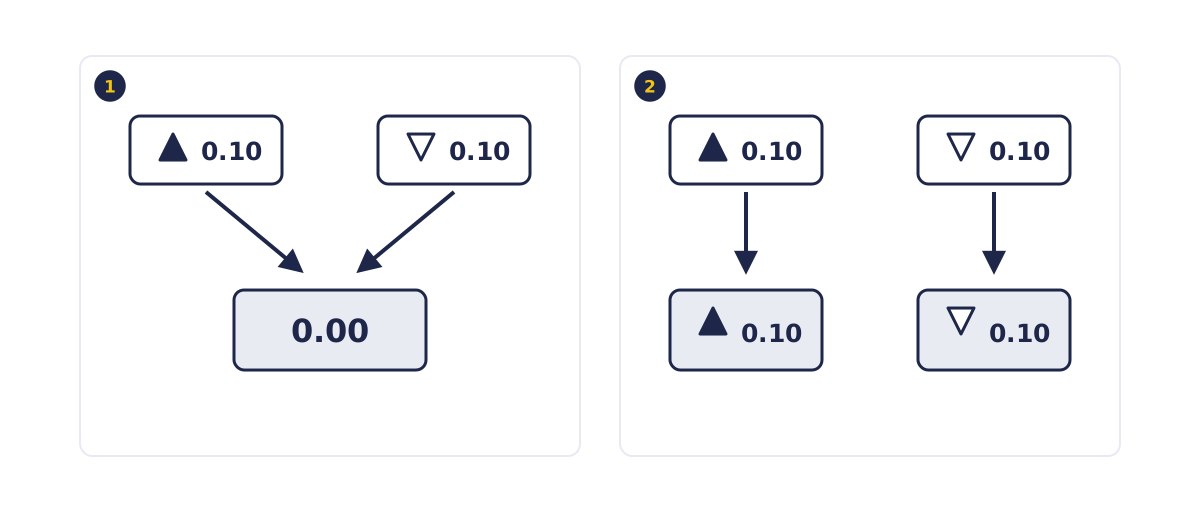
- Netting: a 0.10 lot sell meets a 0.10 lot buy of the same size, so the net volume is 0.00 and no position stays open.
- Hedging: the same two deals stay open side by side as two separate 0.10 lot positions.
How do netting and hedging compare?
Netting and hedging differ in how many positions you can hold on one symbol and in what a new deal does to them. Netting merges every deal into one position with one average price. Hedging keeps each deal as its own position.
| Netting | Hedging | |
|---|---|---|
| Positions per symbol | One | Several, including opposite ones |
| New deal, same direction | Adds to the position and averages the price | Opens a new position |
| New deal, opposite direction | Reduces, closes or reverses the position | Opens a new position |
| How you close | An opposite deal of the same volume | Close each position, or use Close By |
Which is better, netting or hedging?
Netting suits one clear position per symbol, and hedging suits separate entries and exits on the same symbol. Netting gives one position per symbol, with one average price and one set of exits. Hedging gives each trade its own price and exits. MetaQuotes notes that netting is the mode adopted on exchange markets, while hedging can be used for Forex.
- Netting is simpler to read: one line per symbol shows your whole exposure.
- Hedging is more flexible: separate trades on one symbol keep separate exits, but there are more positions to track.
How does margin work for netting and hedging?
In netting, margin is worked out on your one position per symbol. In hedging, a buy and a sell on the same symbol count as hedged, or covered, positions, and the broker decides how margin is calculated for them. MetaQuotes explains this in its help on margin calculation.
The symbol specification can show a Hedged margin value. MetaQuotes says that if it is 0, no margin is charged for the covered volume. The specification in Market Watch shows the exact hedged margin your account uses.
Do Expert Advisors work differently in netting and hedging?
Yes. An Expert Advisor, or EA, sends the same orders in both modes, but the account mode decides what those orders do to your positions. An EA that sells to close a buy will close it in netting, but in hedging the same sell opens a new position and the buy stays open.
MQL5 programs can read the mode through the ACCOUNT_MARGIN_MODE account property, which returns netting, exchange or hedging. If you run an EA, check that it was written for your account's mode, and test it on a demo account first.
How do you check if your MT5 account is netting or hedging?
MetaTrader 5 shows the position accounting system in the terminal window header and in the Journal, according to MetaQuotes' release notes for the hedging update. On a demo account you can also test it: open two tiny opposite trades and count the positions on the Trade tab.
- Log in and look at the top of the platform window and in the Journal tab of the Toolbox.
- On demo, place a minimum-size buy and then a minimum-size sell on the same symbol.
- One line, or none, on the Trade tab means netting. Two lines means hedging. Close the test positions afterwards.
The MetaTrader 5 interface lesson shows where the Toolbox, Trade tab and Journal are.
What is Close By in MT5?
Close By closes two opposite positions on the same symbol against each other, and it works only in a hedging account. MetaQuotes says that, compared with closing the two positions separately, Close By saves one spread. The combined profit or loss of the pair is recorded in one of the two closing deals.
To use it, right-click one position on the Trade tab, choose to close it, set the type to Close By and pick the opposite position. In the example above, closing the 0.40 lot sell by the 1.00 lot buy would leave a 0.60 lot buy open.
What does it cost to hold opposite positions?
Holding a buy and a sell on the same symbol costs a spread on each position and a swap on each one held overnight, while your net exposure stays frozen. In MT5, "hedging" is the name of an accounting mode: the two legs offset each other's price moves until you close one of them.
- Spread on every position. Each position starts slightly negative because you open at one side of the quote and close at the other. Close By saves one spread on a pair, not all of it. See the spread, commission and swap lesson.
- Swap on every position. The symbol specification lists swap long for buy positions and swap short for sell positions. Both rates can be negative, in which case each leg pays swap overnight.
- Exposure returns when you close one side. Once one leg closes, the other moves with price in full.
Try it on demo
On a demo account in MetaTrader 5, buy the minimum volume of one forex pair, then sell the same volume of the same pair. Check the Trade tab to see whether you now hold one position, none, or two. If you hold two, try Close By. The lesson on placing your first trade in MT5 covers the order window.
Quick check
- In a netting account you buy 1.00 lot of EURUSD, then sell 0.40 lot of EURUSD. What is open?
- In a hedging account you make the same two trades. What is open?
- Netting: you buy 1.00 lot at 1.10000, then 0.50 lot more at 1.10300. The new open price is
- Close By is available
- In a hedging account you hold a buy and a sell on the same symbol overnight. What do they cost?
Frequently asked questions
Can I change my MT5 account from netting to hedging?
Usually not on the same account, because the broker sets the accounting system at account level. If you need the other mode, ask your broker whether a different account offers it. On a demo account, the account opening dialog may let you choose hedging.
Can I set a separate stop loss on each position in a hedging account?
Yes. In a hedging account each position has its own ticket number, open price, Stop Loss and Take Profit, and you close each one on its own. In netting, the single position per symbol carries one Stop Loss and Take Profit, which follow the levels in the latest order.
Do all MT5 brokers allow hedging?
No. MetaTrader 5 supports both systems, but the broker sets the system for each account, so some accounts are netting only. Your broker can tell you which of its accounts use hedging.
Is MT5 hedging the same as a hedging strategy?
No. In MT5, hedging and netting are names of position accounting modes: they decide whether opposite positions on one symbol can stay open side by side. Whether to offset a position is a separate trading decision, and each opposite position pays its own spread and swap.
Why did my sell trade close my buy trade?
Because your account uses netting. In netting, an opposite deal on the same symbol reduces or closes your existing position instead of opening a new one. A sell equal in size to your buy closes it completely.
Sources
- MetaQuotes, MetaTrader 5 Help: Basic Principles (Trading Operations), accessed 19 October 2026: MT5 supports netting and hedging position accounting; the system depends on the account and is set by the broker; netting allows one position per symbol that a same-direction deal increases and an opposite deal decreases, closes or reverses; hedging allows multiple positions per symbol, including opposite ones, and cannot reverse a position; Stop Loss and Take Profit follow the latest order when a netting position is increased or reversed. https://www.metatrader5.com/en/terminal/help/trading/general_concept
- MetaQuotes, MetaTrader 5 Help: Performing Trades, accessed 19 October 2026: weighted average open price formula for a netting position; Close By closes two opposite positions of the same symbol, saves one spread compared with closing them separately, and is available only in the hedging system. https://www.metatrader5.com/en/terminal/help/trading/performing_deals
- MetaQuotes, MetaTrader 5 build 1325: Hedging option and testing on real ticks, 22 April 2016: hedging added as a second accounting system; the system is set at account level and displayed in the terminal window header and the Journal; demo accounts can be opened with hedging enabled. https://www.metatrader5.com/en/releasenotes/terminal/1325
- MetaQuotes, Flexible MetaTrader 5 trading system with all order types, accessed 19 October 2026: MetaTrader 5 supports two order accounting modes; netting is adopted on exchange markets, while hedging can be used for Forex trading. https://www.metatrader5.com/en/trading-platform/trading
- MetaQuotes, MetaTrader 5 Help: Margin Calculation (Forex), accessed 19 October 2026: oppositely directed positions of the same symbol are considered hedged or covered; the broker determines the margin calculation method for them; a Hedged margin value of 0 in the contract specification means no margin is charged for the covered volume. https://www.metatrader5.com/en/terminal/help/trading_advanced/margin_forex
- MetaQuotes, MQL5 Reference: Account Properties, accessed 19 October 2026: the ACCOUNT_MARGIN_MODE property returns ACCOUNT_MARGIN_MODE_RETAIL_NETTING (only one position per symbol), ACCOUNT_MARGIN_MODE_EXCHANGE or ACCOUNT_MARGIN_MODE_RETAIL_HEDGING (multiple positions per symbol, margin taking hedged margin into account). https://www.mql5.com/en/docs/constants/environment_state/accountinformation
- MetaQuotes, MetaTrader 5 Help: Market Watch, accessed 19 October 2026: the symbol specification shows swap long for buy positions and swap short for sell positions. https://www.metatrader5.com/en/terminal/help/trading/market_watch
Practise what you learned
Open an account to use MetaTrader 5. Start on a demo account before risking real money.
Open Account