
Trading Checklist Before Entering a Trade: 12 Risk Checks
A trading checklist before entering a trade is a short list of risk checks you answer every time, such as stop loss, position size, margin and news. It slows your decision and catches avoidable mistakes, so every trade you take is sized and planned.
Module 5 · Lesson 5 of 5
What you'll learn
- What a pre-trade checklist is and why skilled traders use one.
- The 12 risk checks to answer before you open any trade.
- Where to find each answer in MetaTrader 5.
- How a single failed check turns a trade into "wait or skip".
This is the last lesson of the Beginner level and of the Risk Management module.
What is a trading checklist before entering a trade?
A trading checklist is a fixed list of risk questions you answer, in the same order, before you open any trade. Each answer is yes or no. All yes, and you may place the trade; any no, and you wait or skip it. The list checks your risk and process, never the market's direction.
Definitions
- Risk amount: the money you accept losing if the stop loss is hit, set before the trade.
- Total open risk: the sum of the risk amounts on every position you have open.
- Free margin: the money still available to open positions. MetaTrader 5 calculates it as equity minus margin.
Why use a checklist before entering a trade?
A checklist slows your decision down and catches avoidable mistakes, such as a missing stop loss, the wrong position size or a trade placed seconds before major news. Pressure, excitement and losses make anyone skip steps. A written list does not depend on how you feel at that moment.
Skilled traders use a checklist so every trade they take is planned: sized to the risk amount, protected by a stop and timed away from avoidable news. Losing trades are a normal part of trading, and the checklist keeps each one to the size you planned. The common mistakes it guards against are covered in why beginners lose money.
What should be included in a trading checklist?
A beginner's trading checklist should include checks on your account and instrument, the market's timing, your reason, your stop and size, your costs and margin, your total risk, gaps, your state of mind and a record of the trade. Every item is a check on risk, not a reason to buy or sell.
| # | Check | Question to answer | Where to find it |
|---|---|---|---|
| 1 | Account and instrument | Am I on demo or live? Is this the right symbol? Have I read its contract size and stops level? | Navigator; Market Watch, right-click, Specification |
| 2 | Session | Is this market open and active, or quiet and thin? | Specification sessions; forex market sessions |
| 3 | News | Is a high-priority release due before or during the trade? | Toolbox, Calendar tab; what moves market prices |
| 4 | Direction and reason | Have I written down buy or sell, and why? | Your trading notes |
| 5 | Stop loss | Where is the stop, and how many pips away? | Order window, Stop Loss field; stop loss and take profit |
| 6 | Position size | Does the size keep the loss at the stop within my risk amount? | Position size calculator; position sizing |
| 7 | Risk:reward and costs | Is the target worth the risk after spread, commission and swap? | Specification; risk:reward ratio |
| 8 | Margin | How much margin will this use, and how much free margin is left? | Toolbox, Trade tab |
| 9 | Total open risk | If every open stop is hit, how much do I lose in total? | Toolbox, Trade tab |
| 10 | Gaps | If price jumps past my stop, can my account take a bigger loss? | Calendar; weekend close |
| 11 | Emotional state | Am I tired, upset, or trying to win back a loss? | Yourself |
| 12 | Log | Will I record this trade and the checklist result? | Toolbox, History tab; your notes |
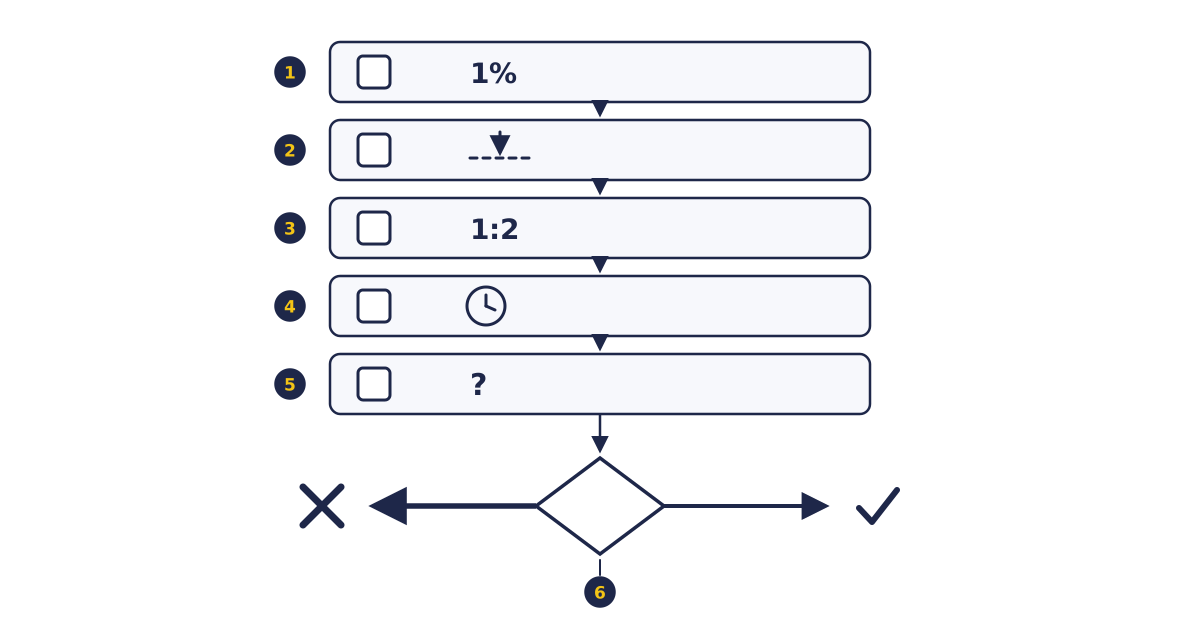
- Rows 1 to 3: risk within your limit (1% in this example), a stop chosen and typed in, and a risk:reward meeting the minimum you set (1:2 here), which the risk reward calculator can confirm.
- Row 4 is timing: the market is open and no major release is due. Row 5 is your state of mind.
- The gate at the bottom: a single no on any row ends the checklist, and the trade is not placed.
How do you run the checklist in MetaTrader 5?
You run the checklist in MetaTrader 5 by reading the symbol's specification, checking the Calendar, filling in the order window, and then checking margin and open risk in the Toolbox, all before you click Buy or Sell. Every answer comes from a window the platform already has.
- Confirm the account. The Navigator shows which account you are logged in to.
- In Market Watch, right-click the symbol and choose Specification. The specification lists the contract size, spread, stops level, swap and trading sessions set by your broker.
- Open the Toolbox and the Calendar tab. Each event shows its release time and priority, and you can filter by currency.
- Press F9 to open the order window. Enter the volume, Stop Loss and Take Profit, but do not send the order yet.
- Check the Trade tab of the Toolbox for balance, equity, margin and free margin, and add up the risk on any positions already open.
- Answer the emotional check honestly. Then place the trade, or close the window.
- After the trade closes, review it in the History tab and write it in your log.
What does the checklist look like on a real trade?
Running the checklist on a trade means passing every check in turn: stop distance, size, risk to reward, cost, margin, total open risk and news. On a $2,000 account risking 1% ($20), you plan to buy EURUSD at 1.08500 with a stop loss at 1.08300.
| Check | Working | Result |
|---|---|---|
| Stop distance | 1.08500 − 1.08300 = 20 pips | Pass |
| Position size | $20 ÷ (20 pips × $10 per pip per lot) = 0.10 lot | Pass |
| Risk:reward | Target 1.08900 is 40 pips, or $40, against $20 of risk = 1:2 | Pass |
| Costs | Spread of 1.2 pips × $1 per pip = $1.20, paid on entry; check swap if held overnight | Pass |
| Margin | 0.10 × 100,000 × 1.085 ÷ 30 = $361.67 at an example leverage of 1:30 | Pass |
| Total open risk | A $20-risk GBPUSD buy is already open, and the two currency pairs often move together: $20 + $20 = $40, or 2% | Pass, at the limit you set |
| News | A high-priority US release is due in 10 minutes | Fail |
If the GBPUSD position uses $420 of margin, free margin after this trade is $2,000 − ($361.67 + $420) = $1,218.33, before running profit or loss. Margin sums are explained in leverage and margin, and what happens if free margin runs out is in margin call and stop-out.
What happens when one check fails?
When one check fails, the checklist's answer is "wait or skip", never "trade anyway" or "trade smaller". In the example, every other check passes, but the news check fails. A release can move the price fast and gap it past your stop, so the stop could fill beyond the $20 loss you planned.
So you either close the order window and run the whole list again after the release, or you skip the idea. A failed check is the checklist doing its job.
How do you keep a trading checklist honest?
You keep a checklist honest by running it before the order is sent, using the real numbers, and reading a pass as permission to trade, not as a forecast. The checklist controls planned risk and avoidable errors, and skilled traders protect that by avoiding four common slips:
- Running it after clicking. A list ticked once the trade is open is a story, not a check.
- Editing the numbers to pass. Moving the target further away so the ratio passes changes nothing in the market.
- Treating a pass as a prediction. A pass means the trade is planned; a passing trade still hits its $20 stop when the price goes the other way.
- Ignoring gaps and slippage. A stop loss can close at a worse price in a fast or gapping market, so check the news and the weekend close before holding.
Try it on demo
Copy the 12 checks into a note. On a MetaTrader 5 demo account, run them for your next five trade ideas before pressing Buy or Sell, and record which check stopped any idea you skipped.
Writing your own trading rules, and later a full trading plan, are covered in later levels of the academy.
Quick check
- What is a pre-trade checklist for?
- A $2,000 account risks 1% per trade with a 20-pip stop on EURUSD at $10 per pip per lot. The position size is
- You already risk $20 on GBPUSD and add $20 on EURUSD, which often moves the same way. Your total open risk is
- Every check passes, but a high-priority news release is due in 10 minutes. The checklist result is
- Where in MetaTrader 5 do you see free margin?
Frequently asked questions
What should I check before entering a trade?
Check your account and symbol, the session, upcoming news, your written reason, your stop loss, your position size, risk:reward and costs, margin, total open risk, gap risk and your emotional state. Then log the trade.
How many items should a trading checklist have?
Each item must have a clear yes or no answer, and the number can grow with you. You can start with a short core of size, stop, ratio, timing and emotion, and add checks as you learn.
How do I make my own trading checklist?
Start from the 12 checks in this lesson and keep only questions with a clear yes or no answer. Write the limits you have set, such as your risk per trade, next to each check. Keep the list beside your platform, and review it against your trade log every few weeks.
What is the difference between a trading plan and a trading checklist?
A trading plan sets the big picture: which markets you trade, how you find setups and your risk rules. A checklist applies that plan to one trade at a time, as yes or no questions answered before the order is sent. Writing a full trading plan is covered in later levels.
Should I trade before major news?
The checklist treats a major release as a failed check. Prices can move fast and gap around news, so the usual answer is to wait until after the release and run the checklist again, or to skip the trade.
Sources
- MetaQuotes, MetaTrader 5 Help: Market Watch (accessed 27 October 2026): the symbol specification shows contract size, spread, stops level, swap and trading sessions. https://www.metatrader5.com/en/terminal/help/trading/market_watch
- MetaQuotes, MetaTrader 5 Help: Executing Trades (accessed 27 October 2026): the order window opens with F9 and has Volume, Stop Loss and Take Profit fields; open positions are listed in the Toolbox; free margin = equity − margin. https://www.metatrader5.com/en/terminal/help/trading/performing_deals
- MetaQuotes, MetaTrader 5 Help: Fundamental Analysis (accessed 27 October 2026): the Calendar tab of the Toolbox shows each event's release time and priority, filterable by currency. https://www.metatrader5.com/en/terminal/help/charts_analysis/fundamental
Practise what you learned
Open an account to use MetaTrader 5. Start on a demo account before risking real money.
Open Account