
How to Backtest in MetaTrader 5 With the Strategy Tester
Backtesting is running a fixed set of trading rules over past price data to see how those rules would have behaved. In MetaTrader 5 you do it in the Strategy Tester, which reports profit factor, expected payoff and drawdown for the period you choose.
Module 14 · Lesson 2 of 5
What you'll learn
- What backtesting is, and the question it answers.
- How to open and set up the Strategy Tester in MetaTrader 5.
- How to backtest a manual strategy by replaying past candles in visual mode.
- How to read profit factor, expected payoff and drawdown in the report.
- How to price in costs, avoid overfitting and validate a result on untested data.
New to the platform? Start with how to use MetaTrader 5.
What is backtesting?
Backtesting is running a fixed set of trading rules over past price data to see how those rules would have behaved. It answers one precise question: what did these exact rules do on this exact history? That makes it the fastest way to filter a rule set before you spend time on a demo forward test.
A backtest needs rules precise enough for a computer to follow, which is why the trading rules lesson comes first. In MetaTrader 5 the rules live inside an Expert Advisor (EA), a program that places and manages trades, covered in the Expert Advisors lesson. If you trade by hand, you can still backtest by replaying past candles in visual mode, as shown below.
How do you open the MT5 Strategy Tester?
You open the MT5 Strategy Tester by pressing Ctrl+R, or by right-clicking an Expert Advisor in the Navigator window and choosing Test. MetaQuotes lists Ctrl+R as the shortcut that opens and closes the Tester window. Choosing Test loads that EA into the tester.
How do you set up a backtest in the MT5 Strategy Tester?
To set up a backtest in the MT5 Strategy Tester, choose the Expert Advisor, symbol, timeframe, dates, modelling mode, deposit and leverage, then press Start. Each setting changes the result, so write all of them down with every test, or you cannot repeat or compare runs later.
| Setting | What it controls |
|---|---|
| Expert | The EA whose rules are tested |
| Symbol and timeframe | The instrument and chart period the EA runs on |
| Date | A preset period or a custom start and end date |
| Forward | Splits off a later part of the dates for a forward test (No, 1/2, 1/3, 1/4 or Custom) |
| Delays | No delay, random delay or a fixed delay between an order and its fill |
| Modelling | How the tester builds prices inside each bar |
| Deposit and leverage | The starting balance and the leverage used for margin |
| Visualization | Replays the test on a chart so you can watch each trade; off during optimisation |
Leverage in the tester changes how much margin each position ties up, not what each price move is worth. The margin calculator shows the margin a position needs.
What are the MT5 modelling modes?
The modelling mode decides which prices the tester feeds the EA inside each bar, trading accuracy against speed. MetaQuotes' testing help page lists four history-based modes, plus a Math calculations mode that loads no price history.
| Mode | What the tester uses | Accuracy and speed |
|---|---|---|
| Every tick based on real ticks | Your broker's recorded ticks | Closest to real conditions; the first run can be slow while ticks download |
| Every tick | Every tick, simulated by the tester | Described by MetaQuotes as the most accurate but the slowest mode |
| 1 minute OHLC | Open, high, low and close of each minute bar | Faster; misses moves inside each minute |
| Open prices only | The open price of each bar | Fastest; ignores every move inside the bar |
How do you backtest a manual strategy in MT5?
To backtest a manual strategy in MT5, run the Strategy Tester in visual mode on an indicator, not an Expert Advisor, so the chart replays past candles one by one. Slow it with the speed slider, pause at each setup, write down the entry, stop and target, then resume and record how each trade would have ended.
Most traders who place trades by hand have no EA, and they do not need one to test their rules on history. Visual testing turns on automatically when you test an indicator, and the replay shows only the candles up to the current moment, so you cannot see what comes next.
- Write the rules first. Entry signal, stop, target and when you skip a trade, as in writing trading rules. Rules you decide on the spot cannot be tested.
- Set up an indicator test. Press Ctrl+R, switch the tester from Expert to Indicator, and choose an indicator your rules use, such as Moving Average from the Examples folder. Pick the symbol, the timeframe and a custom date range. The replay chart's timeframe cannot be changed once it starts, so choose it here.
- Choose the modelling. Use Every tick based on real ticks, or 1 minute OHLC for a faster replay of higher timeframes.
- Start the replay. Click Start. The visualization window opens and candles begin to form from the first date.
- Control the speed. Drag the speed slider down so candles form slowly enough to read. Pause when a setup appears; to move forward a candle or two at a time, resume at the lowest speed and pause again.
- Record each trade. While paused, note the time, direction, entry, stop and target. The Data Window (Ctrl+D) shows the open, high, low and close of the candle under your cursor, so you can read exact prices. Resume and note whether the stop or the target was hit first.
- Total the results. After 30 or more setups, convert each result into R, the multiple of the amount risked, and work out the average.
| Trade | Direction | Stop distance | Result | In R |
|---|---|---|---|---|
| 1 | Buy EURUSD H1 | 20 pips | Target hit, +40 pips | +2.0R |
| 2 | Sell EURUSD H1 | 20 pips | Stop hit, −20 pips | −1.0R |
| 3 | Buy EURUSD H1 | 20 pips | Closed by rule, +30 pips | +1.5R |
| Total | +50 pips | +2.5R, or 0.83R a trade |
Each R is the result divided by the stop distance: 40 ÷ 20 = 2.0, −20 ÷ 20 = −1.0 and 30 ÷ 20 = 1.5. The total is 2.0 − 1.0 + 1.5 = 2.5R, and 2.5R ÷ 3 ≈ 0.83R a trade. Three trades say very little; the same arithmetic over 30 to 100 setups gives a figure worth comparing. The expectancy calculator turns a win rate and average win and loss into the same figure, and a trading journal keeps the log.
A replay like this produces your notes rather than a tester report. To get a full report from a manual strategy, run an EA that adds Buy and Sell buttons to the visual chart, so the tester records each trade you click; free examples of such tools are shared on the MQL5 site.
How do you read a Strategy Tester report?
You read a Strategy Tester report by starting from gross profit and gross loss, because almost every other figure is built from them. Then check drawdown, which shows how far the account fell along the way. MetaQuotes' report help page defines the main fields:
- Total net profit: the financial result of all trades.
- Gross profit and gross loss: the sum of all winning trades and of all losing trades, in money.
- Profit factor: gross profit ÷ gross loss. At 1.00 they are equal; below 1.00 the test lost money.
- Expected payoff: the average result of one trade.
- Balance and equity drawdown maximal: the largest fall from a high point, in balance (closed trades only) and in equity (including open trades).
- Total trades: the number of trades that closed with a profit or loss.
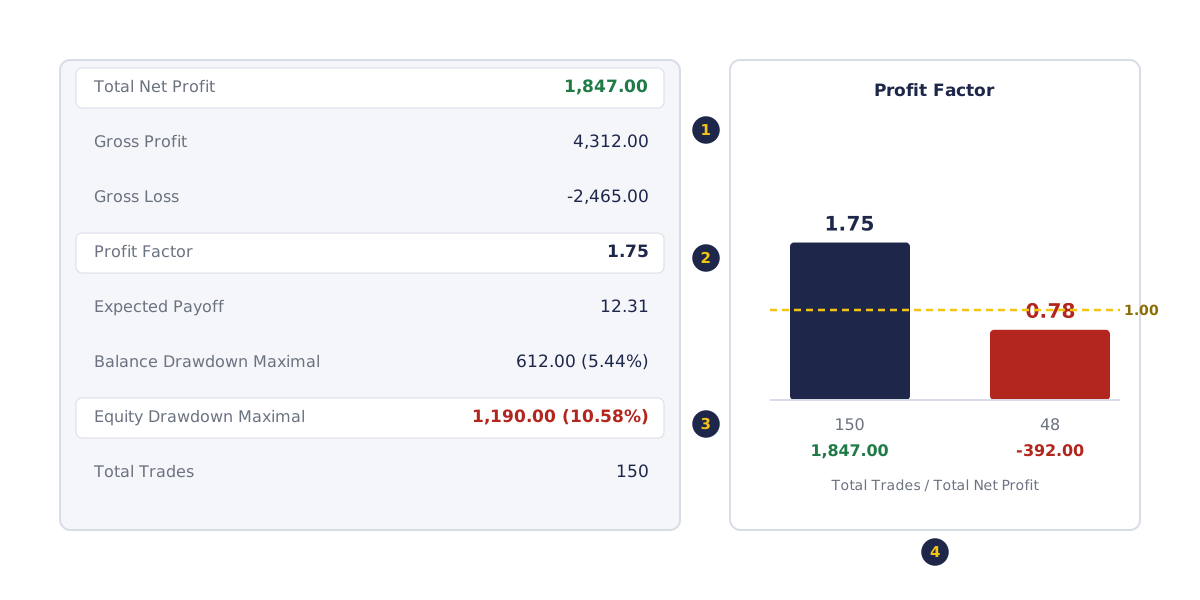
- Gross profit $4,312 minus gross loss $2,465 is net $1,847; $4,312 ÷ $2,465 gives a profit factor of 1.75.
- Expected payoff is $1,847 ÷ 150 trades = $12.31 a trade.
- Equity drawdown ($1,190) is nearly double balance drawdown ($612), because open trades sank further.
- The same settings on a held-back period: 48 trades, net −$392, profit factor 0.78.
Read your own reports the same way, and log each test's settings and figures in your trading journal.
How do you calculate the results of a backtest?
Profit factor = gross profit ÷ gross loss, and expected payoff = net profit ÷ number of trades. Both come straight from the report's totals, so you can check them by hand. Working them out on a simple synthetic test shows how sensitive both numbers are to costs.
Worked example: a synthetic 100-trade test
A test produces 100 trades: 45 wins averaging $60 and 55 losses averaging $40.
- Gross profit: 45 × $60 = $2,700. Gross loss: 55 × $40 = $2,200.
- Net profit: $2,700 − $2,200 = $500.
- Profit factor: $2,700 ÷ $2,200 = 1.23.
- Expected payoff: $500 ÷ 100 = $5 per trade.
Now suppose the test understated costs by $3 a trade, for example a wider spread or a missing commission. Each win shrinks to $57 and each loss grows to $43:
| As tested | With $3 extra cost per trade | |
|---|---|---|
| Gross profit | $2,700 | $2,565 |
| Gross loss | $2,200 | $2,365 |
| Net profit | $500 | $200 |
| Profit factor | 1.23 | 1.08 |
| Expected payoff | $5.00 | $2.00 |
Three dollars a trade removed 60% of the net result.
Why do costs matter in a backtest?
Costs matter because a small cost on every trade adds up across hundreds of trades, so a test that understates costs overstates the result. Spread, commission and swap are explained in the spread, commission and swap lesson. If a small extra cost per trade turns a result negative, the test had little room for error.
The tester's advanced settings let you charge a commission after each trade, so set it to match your account's contract specification.
What is overfitting in backtesting?
Overfitting is tuning a strategy's settings until they fit past data so closely that they describe that history rather than a repeatable pattern. MetaQuotes defines optimisation as many runs of an EA on history with different sets of inputs. With enough runs, some setting will look good by chance alone.
In-sample, out-of-sample and forward testing
- In-sample: the period the settings were tuned on.
- Out-of-sample: a period held back and tested once, with the settings untouched.
- Forward test: in MT5, the Forward setting reruns the best optimisation results on a later part of the dates, which MetaQuotes describes as a way to avoid fitting settings to certain time intervals.
How do you validate a backtest?
You validate a backtest by running the chosen settings, unchanged, on a period they were not tuned on, then forward testing them on a demo account and comparing all three reports. When profit factor, expected payoff and equity drawdown stay in a similar range across them, the rules are capturing a repeatable pattern rather than one stretch of history.
- Optimise on the in-sample period and pick one set of inputs.
- Run that set once on the out-of-sample period, or use the Forward setting to do it for you.
- Run the same inputs on a demo account with live prices and real fills.
- Compare the three reports side by side, using the same fields each time.
How do you make a backtest more realistic?
You make a backtest more realistic by using real-tick modelling, charging your account's real costs, adding order delays, testing across different market conditions and collecting enough trades. Each step closes a gap between how the tester prices a trade and how a live account fills it, so the report you read is closer to live trading.
- Market variety: test across trending, ranging and sharply volatile months, not only calm trends.
- Price data: use Every tick based on real ticks; simulated ticks are an estimate, and price history can have gaps.
- Fills: use the Delays setting, and remember live fills can slip and spreads widen around news.
- Sample size: collect many trades; a few dozen say very little.
- Look-ahead bias: use only information available at the time. A rule that reads a bar's close before the bar finished flatters the test.
Try it on demo
On a demo account in MetaTrader 5, press Ctrl+R and test any Expert Advisor from your Navigator on one symbol and timeframe over one year, using "Every tick based on real ticks". Write down the profit factor, expected payoff and equity drawdown. Then run the same settings on the year before, unchanged, and compare.
This lesson is part of the Trading Automation module.
Quick check
- In the MT5 report, a profit factor of 1.00 means
- A test shows gross profit $2,700 and gross loss $2,200 over 100 trades. The expected payoff is
- Adding $3 of extra cost to each of those 100 trades changes the net result to
- Overfitting is
- An out-of-sample test means running
Frequently asked questions
Where is the Strategy Tester in MT5?
The Strategy Tester opens with Ctrl+R, which shows or hides the Tester window in MetaTrader 5. You can also right-click an Expert Advisor in the Navigator window and choose Test.
Does backtesting work?
Yes, for the job it is built for: showing how fixed rules behaved on past data and filtering out rules that fail even there. Pair it with an out-of-sample test and a demo forward test to see how the rules hold up on data they were not tuned on.
What is a good profit factor in backtesting?
Above 1.00 means gross profit exceeded gross loss on that history. Compare the figure after costs and on a held-back period: a profit factor that holds up there tells you more than a high one on tuned data.
How many trades do you need for a backtest?
Aim for enough trades to cover trending, ranging and volatile periods. More trades across different kinds of market give a steadier picture than a few dozen from one kind of market.
What is the difference between backtesting and forward testing?
Backtesting runs rules on past data. Forward testing runs the chosen settings on data they were not tuned on: a held-back later period in the tester, or live prices on a demo account.
Sources
- MetaQuotes, MetaTrader 5 Help: Hotkeys, accessed 19 October 2026: Ctrl+R opens and closes the Tester window. https://www.metatrader5.com/en/terminal/help/start_advanced/hotkeys
- MetaQuotes, MetaTrader 5 Help: Testing Trading Strategies, accessed 19 October 2026: opening a test from the Navigator context menu; the date, forward, delay, deposit and leverage settings; the tick generation modes, with Every tick described as the most accurate but the slowest and real ticks as close to real conditions; commission settings; forward testing to avoid fitting to certain time intervals. https://www.metatrader5.com/en/terminal/help/algotrading/testing
- MetaQuotes, MetaTrader 5 Help: Testing Report, accessed 19 October 2026: definitions of total net profit, gross profit, gross loss, profit factor, expected payoff, balance and equity drawdown and total trades. https://www.metatrader5.com/en/terminal/help/algotrading/testing_report
- MetaQuotes, MetaTrader 5 Help: Strategy Optimization, accessed 19 October 2026: optimisation as multiple runs on history with different input sets, and forward testing as rerunning the best results on a different period. https://www.metatrader5.com/en/terminal/help/algotrading/strategy_optimization
- MetaQuotes, MetaTrader 5 Help: Visual Testing, accessed 19 October 2026: the Visualization option shows each trade of a test on a chart; it needs optimisation disabled. https://www.metatrader5.com/en/terminal/help/algotrading/visualization
Practise what you learned
Open an account to use MetaTrader 5. Start on a demo account before risking real money.
Open Account