
Trading Journal: What to Record, With a Free Template
A trading journal is a record of every trade you take, with your plan and reason before entry, the result after, and whether you followed your rules. Because it records decisions and not just profit or loss, it shows which losses came from the plan and which came from breaking it.
Module 11 · Lesson 3 of 4
What you'll learn
- What a trading journal is and why it records decisions, not just results.
- What to write in each entry, with a trading journal template you can copy.
- How to work out a win rate, average win and loss in R, and a rule-break count.
- A simple weekly routine for reading your journal.
This lesson is part of the Trading Psychology module.
What is a trading journal?
A trading journal is a written record of every trade you take: what you planned before you entered, why, what happened, and whether you followed your own rules. It records decisions, not just results. Your platform already stores prices and profit or loss; only a journal stores the reason, the rule check and how you felt.
A $20 loss taken as planned and a $20 loss taken on impulse look the same in your account history. In a journal they look different, and need different fixes.
Definitions
- R (risk unit): the money you lose if the stop loss is hit. If you risk $20, then 1R = $20.
- R-multiple: a trade's result divided by its R. A $40 gain on $20 of risk is +2R; a full stop-out is −1R.
- Rule check: a yes or no answer to "Did this trade follow my written rules?"
Why does a trading journal matter?
A trading journal matters because memory is easy to rewrite once the outcome is known, while a note written at the time is not. It shows whether your losses come from the plan itself or from breaking it, which is the first question any honest review of your trading has to answer.
The rules from the writing trading rules lesson only help if something records whether you followed them, and that record is the journal.
What should a trading journal include?
A trading journal should include, for every trade, the date and time, instrument, direction, size, entry, stop loss, take profit, reason, risk in money and as a percentage, result, R-multiple, a rule check, a short emotion note and screenshots. Fill in everything up to the risk before you enter, and the rest after you close.
Working out the size that matches your risk is covered in the position sizing lesson, and the position size calculator does the arithmetic.
What should a trading journal template include?
A simple trading journal template is one table with a column for each item and one row per trade. Copy it into a spreadsheet or notebook, and fill in the columns up to Risk before you enter. The example is a synthetic trade on a $2,000 demo account.
| Column | What to record | Example entry |
|---|---|---|
| Date and time | When you opened, with time zone | 12 Oct 2026, 10:15 UTC+1 |
| Instrument | The symbol, such as a currency pair | EURUSD |
| Direction | Buy or sell | Buy |
| Size | Volume in lots | 0.04 |
| Entry, stop, target | The three order prices | 1.10000, 1.09500, 1.11000 |
| Reason | One sentence, before entry | Retest of 1.1000 support in an H4 uptrend |
| Risk | Money and % of account | $20, 1% |
| Result | Profit or loss after costs | +$40 |
| R-multiple | Result ÷ risk | +2R |
| Rule followed? | Yes, or no and which rule | Yes |
| Emotion note | One or two words | Calm |
| Screenshots | Entry and exit charts | 2 files saved |
The diagram shows one page for a larger account: 0.20 lot with a 50-pip stop risks $100, 1% of $10,000.
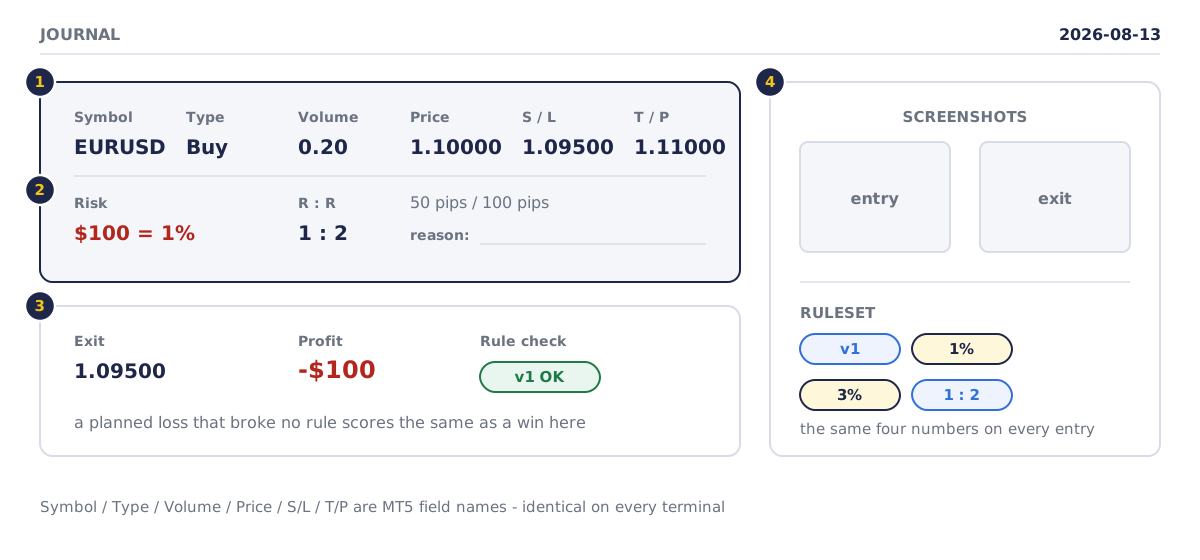
- Before the order: symbol, type, volume, price, S/L and T/P, as MT5 names them.
- Risk and ratio before the click: $100 is 1%, and a 50-pip stop with a 100-pip target is 1:2.
- After the close: the stop was hit for −$100, yet the rule check is OK because the plan was followed.
- Screenshots, and the ruleset version (v1) with its numbers, such as 1% risk per trade and a 3% daily loss limit.
How do you start a trading journal?
To start a trading journal, pick a format, copy the template columns above, and fill in one row for every trade: the plan before you enter and the result after you close. A spreadsheet, a paper notebook or a journal app all work. What matters is that no trade is skipped and each row is written at the time.
| Option | Strengths | Limits |
|---|---|---|
| Spreadsheet | Free, totals automatically | Needs a device |
| Paper notebook | Free, no setup | Arithmetic by hand |
| Journal app | Can import trades | May cost money; you still type reasons |
How do you export your trade history from MetaTrader 5?
MetaTrader 5 keeps your trade history in the History tab of the Toolbox window, and can turn it into a report you save as HTML or PDF. The History tab can show positions, orders or deals for a period you choose, according to MetaTrader 5 Help.
- Open the Toolbox window and select the History tab.
- Choose the period you want to review.
- Right-click the history and choose Report, then Overview. The MetaTrader 5 trading report also opens from Reports in the View menu.
- Save the report as HTML or PDF.
How do you calculate statistics from a trading journal?
From a trading journal you can calculate three simple numbers: your win rate, your average win and loss in R, and a count of rule breaks. They describe your own trades for self-review, and they become more reliable as the number of journalled trades grows.
- Win rate = winning trades ÷ total trades × 100.
- Average win or loss in R = the average money result ÷ R.
The MT5 report shows win trades as a percentage and average profit and loss, but it cannot tell whether you followed your rules. Expectancy and drawdown come later, in Module 15; once you have a record, the trading expectancy calculator turns your win rate and average win and loss into an average per trade.
Worked example: five demo trades
A synthetic $2,000 demo account risks $20 (1% and 1R) on every trade. One week of entries:
| Trade | Result | R-multiple | Rule followed? | Emotion note |
|---|---|---|---|---|
| 1 | +$40 | +2R | Yes | Calm |
| 2 | −$20 | −1R | Yes | Calm |
| 3 | −$20 | −1R | No: no setup, entered right after trade 2 | Frustrated |
| 4 | +$30 | +1.5R | Yes | Nervous |
| 5 | −$20 | −1R | Yes | Calm |
- Net result: +$40 − $20 − $20 + $30 − $20 = +$10, which is +0.5R.
- Win rate: 2 wins ÷ 5 trades = 40%.
- Average win: ($40 + $30) ÷ 2 = $35, which is 1.75R.
- Average loss: ($20 + $20 + $20) ÷ 3 = $20, which is 1R.
- Rule breaks: 1 of 5 trades.
Five trades are a small sample: one more loss would turn this week negative. What the journal does show is trade 3, a rule break straight after a loss, marked "frustrated". That is the pattern described in the revenge trading lesson, and it, not the +$10, is what the review should act on.
How do you review a trading journal?
Review your trading journal at a fixed time, such as once a week, away from live charts, and look at your behaviour before your results. Rule breaks and the emotions beside them show up within a few trades, while what your numbers mean takes far longer to judge. A short routine:
- Check every trade has a complete entry, with the reason written before entry.
- Count the rule breaks and read the emotion notes beside them.
- Work out the three numbers and note them without judging them.
- Pick one thing to change next week. Change written rules only here, never during a trade.
A fuller weekly and monthly review cycle comes later, in Module 15.
How do you keep a trading journal accurate?
You keep a trading journal accurate by writing each entry at the time, logging every trade without exception, and judging the numbers only once enough trades have built up. The journal is a record of what you actually did. Kept that way, it shows you exactly which habit to change next.
- Write before the close: a reason written after the close tends to fit the outcome, so write it before you click.
- Log every trade: the trades you would rather forget are the ones you most need to see.
- Let the sample grow: a win rate from 5 or 20 trades can change sharply with one more trade, so read behaviour first and numbers later.
Try it on demo
On a MetaTrader 5 demo account, copy the template into a spreadsheet and journal your next five demo trades, writing the reason and risk before each order. After the fifth, open the History tab, choose Report, then Overview, and compare its figures with yours. Then count your rule breaks.
Quick check
- A trading journal is mainly a record of
- A trade risked $20 and closed with a $30 gain. Its R-multiple is
- Five journal entries show 2 wins and 3 losses. The win rate is
- When should you write the reason for a trade?
- A trade followed every rule but hit its stop loss. In the journal it should be marked
Frequently asked questions
Is there a free trading journal?
Yes. The table in this lesson is a free trading journal template: copy its columns into a spreadsheet or paper notebook. The MetaTrader 5 trading report, which you can save as HTML or PDF, also comes with the platform at no extra cost.
What is an R-multiple in a trading journal?
An R-multiple is a trade's result divided by the money you risked on it. Risk $20 and gain $30, and the trade was +1.5R; a full stop-out is −1R. It puts trades of different sizes on one scale.
What is the difference between a trading plan and a trading journal?
A trading plan is written before you trade and sets your rules; a trading journal is written as you trade and records whether you followed them. The plan says what you intend to do, the journal shows what you actually did, and the review compares the two.
Does keeping a trading journal work?
Yes, when you read it and act on it. A journal shows patterns that memory smooths over, such as rule breaks after a loss, so you can write a rule aimed at the exact habit behind them.
Sources
- MetaQuotes, MetaTrader 5 Help: Trading Report, accessed 19 October 2026: the report is built from the account's trading history, opens with Report, then Overview, in the context menu of the trading history or Reports in the View menu, can be saved as HTML or PDF, and shows figures including win trades as a percentage, average profit and average loss. https://www.metatrader5.com/en/terminal/help/trading/report
- MetaQuotes, MetaTrader 5 Help: Executing Trades, accessed 19 October 2026: the History tab of the Toolbox window can show the trading history as positions, orders or deals, for a selected period. https://www.metatrader5.com/en/terminal/help/trading/performing_deals
Practise what you learned
Open an account to use MetaTrader 5. Start on a demo account before risking real money.
Open Account