
How to Read an Economic Calendar: Forecast, Actual and Surprise
To read an economic calendar, check each event’s time, currency and importance, then compare the actual figure with the forecast when it is released. The gap between them, the surprise, is what markets tend to react to, not the number itself.
Module 8 · Lesson 1 of 5
What you'll learn
- What each column of an economic calendar means.
- How to work out the surprise and why the reaction depends on expectations.
- How to convert release times to your own time zone.
- How to find the calendar in MetaTrader 5 and how prices behave around a release.
What is an economic calendar?
An economic calendar is a schedule of upcoming economic data releases and central bank events, listed by date, time, country and currency. Each row shows the event's importance, the previous figure, the forecast and, once released, the actual. It tells you exactly when a number will arrive, so you can plan around it.
Official agencies publish release dates in advance. The US Bureau of Labor Statistics release schedule, for example, shows its Consumer Price Index (CPI), a measure of inflation, coming out at 08:30 Eastern Time on set dates.
This lesson opens the Fundamental Analysis module and builds on what moves market prices.
How do you read an economic calendar?
To read an economic calendar, go across each row: the time, the country or currency, the event, its importance, and then the previous, forecast and actual figures. Before the release you compare the forecast with the previous figure; after it, you compare the actual with the forecast.
| Column | What it shows |
|---|---|
| Time and time zone | Release time, in the calendar's time zone, which may not be yours |
| Country or currency | Where the data comes from and the currency most affected |
| Event | What is being measured, such as CPI y/y (inflation over 12 months) |
| Importance | How much this release has tended to move prices, often one to three dots |
| Actual | The figure as released; blank until the release time |
| Forecast or consensus | The typical expectation of economists surveyed before the release |
| Previous | Last period's figure |
| Revised | On some calendars, the previous figure after a later correction |
Definitions: forecast, consensus, importance and revision
The forecast or consensus is a single expected figure built from economists' estimates. It is public, so it is usually already reflected in the price before the release. Importance (also called impact or priority) estimates the size of a possible reaction. It is not a direction. Some calendars also colour the actual green or red to show whether it beat or missed the forecast; that colour describes the gap, not which way any price will move.
A revision is a later correction to a published figure. Some data arrive first as early estimates: the US Bureau of Economic Analysis publishes an advance estimate of GDP about a month after the quarter ends, then second and third estimates that add data not available earlier. A large revision to the previous figure can change how a new release is read.
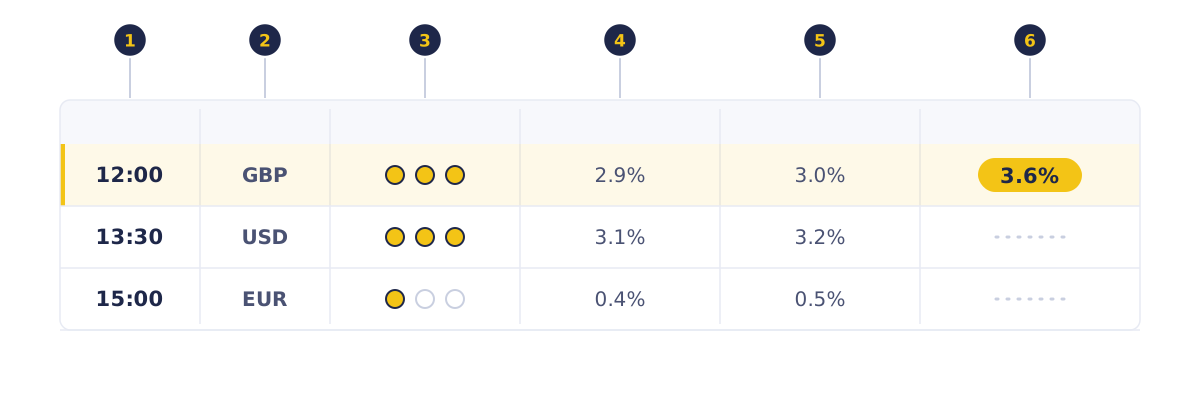
- Markers 1 to 3: release time, currency and importance; three filled dots is the highest.
- Markers 4 and 5: the previous figure and the forecast.
- Marker 6: the actual. Only the 12:00 GBP row has been released, at 3.6% against a 3.0% forecast, a surprise of +0.6 points. The other rows are still waiting.
What does surprise mean on an economic calendar?
Surprise is the actual figure minus the forecast. A positive surprise means the number came in above expectations; a negative one, below. Because the forecast is public and usually already in the price, markets tend to react to the surprise, not to whether the number is high or low.
Surprise = actual − forecast
The previous figure gives context, but it is not part of the surprise. A number can be higher than last month and still disappoint if the market expected more.
| Actual compared with forecast | What it means | What often happens |
|---|---|---|
| Above forecast | Positive surprise | A larger move is possible, in either direction |
| In line with forecast | No surprise | Often a smaller move, because the figure was already priced in |
| Below forecast | Negative surprise | A larger move is possible, in either direction |
Direction depends on what the data means for future decisions, such as interest rates, and on what else the market is watching. The same surprise can move prices sharply one month and barely the next. What each major release measures is covered in major economic releases.
How do you convert calendar times to your time zone?
To convert a calendar time, find the calendar's time zone, convert it to UTC, then add your own offset, such as one hour at UTC+1 or eight hours at UTC+8. Much of Africa and Asia skips daylight saving, but the US does, so US releases shift an hour in UTC twice a year.
The local trading day for each market is laid out in the country guides.
| Release | US Eastern Time | UTC | UTC+1 (West and Central Africa) | UTC+2 (Southern Africa) | UTC+7 (mainland Southeast Asia) | UTC+8 (maritime Southeast Asia and East Asia) |
|---|---|---|---|---|---|---|
| US CPI, US summer time | 08:30 | 12:30 | 13:30 | 14:30 | 19:30 | 20:30 |
| US CPI, US winter time | 08:30 | 13:30 | 14:30 | 15:30 | 20:30 | 21:30 |
Many calendars let you choose the display time zone, so check that setting first. Session hours shift the same way, as explained in forex market sessions.
How do you use an economic calendar?
To use an economic calendar, filter it to high-importance events for the currencies you trade, note each time on your own clock, and mark which open positions or planned trades each event affects. Releases follow a rhythm: many come out on the same weekday each week or at a similar point each month.
- Filter to the currencies behind your instruments; gold and US indices are affected by US data too.
- Keep high-importance events, then review medium ones.
- Convert each time to your own clock.
- Write down which positions are exposed to each event.
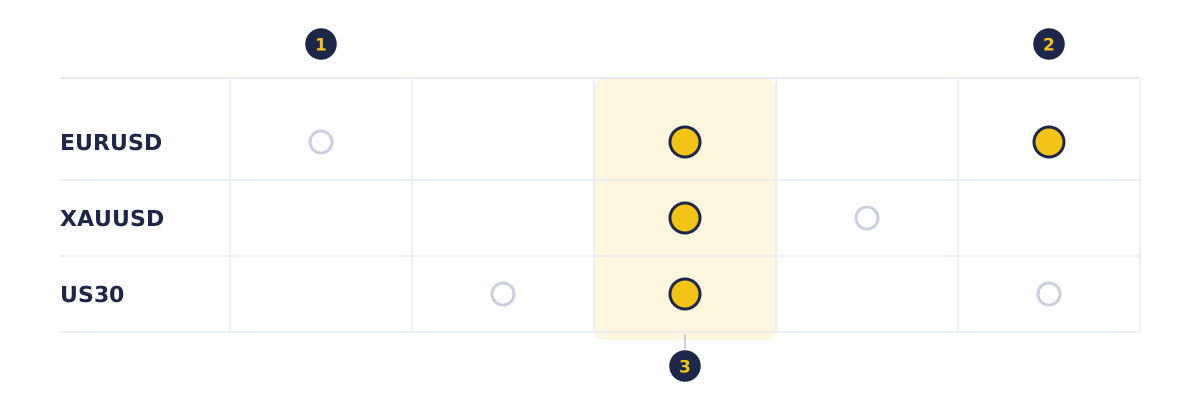
- Each column is a trading day, Monday to Friday; each row is an instrument you hold or watch.
- A filled marker is a high-importance release; a hollow marker is medium importance.
- On Wednesday, one high-importance release touches all three instruments at once.
How do you read a CPI row on the calendar?
To read a calendar row, compare the actual with the forecast: the gap, called the surprise, is what moves price, not the actual number alone. A calendar shows this CPI row before the release, with inflation expected to ease from 3.1% to 3.0%:
| Time (UTC) | Currency | Event | Importance | Previous | Forecast | Actual |
|---|---|---|---|---|---|---|
| 12:30 | USD | CPI y/y | High | 3.1% | 3.0% | 3.3% |
- The market expected inflation to ease from 3.1% to 3.0%. The actual is 3.3%, so the surprise is 3.3 − 3.0 = +0.3 points.
- 12:30 UTC is 13:30 at UTC+1 and 20:30 at UTC+8 while the US is on summer time.
Traders often read higher-than-expected inflation as making higher interest rates more likely, which can support the US dollar. Skilled traders also watch the follow-through: the first move can reverse within minutes, or other news can outweigh it.
Suppose you hold 0.10 lot of EURUSD, worth about $1 per pip. A 40-pip move is about $40 for or against you, before slippage. Check the pip value for other pairs with the pip value calculator.
Where is the economic calendar in MetaTrader 5?
In MetaTrader 5, the economic calendar is on the Calendar tab of the Toolbox window. The MetaTrader 5 help says each event shows its release time, priority and current, forecast and previous values, and the right-click menu filters events by priority, currency or country.
Its Add All Events command marks the events on a chart, so you can see how price behaved around them.
How do prices behave around economic releases?
Around a major release, prices move fast, spreads widen and orders can fill away from the price you requested. The calendar tells you exactly when that volatility arrives, so you can set your size and stops before it. Several releases can also land at the same minute, so one move may reflect more than one number.
- Wider spreads: liquidity can thin out around a release, so trading costs more.
- Gaps: the price can jump from one level to another with no trades in between.
- Slippage: a market order or a stop-loss can be filled at a worse price than the level you set, so a loss can be larger than planned.
Managing trades through news is covered in Module 10, Trade Management.
Try it on demo
On a demo account in MetaTrader 5, open the Toolbox, select the Calendar tab and filter it to high-priority USD events. Write down every event for the coming week with its time on your own clock. After one release, use Add All Events on a EURUSD chart and compare the actual with the forecast. You can also check the same week on KCM's economic calendar.
Quick check
- The forecast for a release is 3.0% and the actual is 3.3%. The previous figure was 3.1%. The surprise is
- The importance rating on a calendar tells you
- A release is due at 12:30 UTC. What time is that at UTC+8?
- You hold 0.10 lot of EURUSD, worth about $1 per pip, and the price moves 40 pips against you after a release. Your loss is about
- A release comes out exactly in line with the forecast. What often happens?
Frequently asked questions
What does previous, forecast and actual mean on an economic calendar?
Previous is last period's figure, forecast is economists' typical expectation, and actual is the released number. Actual minus forecast is the surprise.
Which economic calendar events are most important?
The most important events are usually those rated highest on the calendar, such as inflation, employment and central bank interest rate decisions for major currencies. Ratings are based on how strongly each release has moved prices in the past.
Does good economic news always strengthen a currency?
No. If good news was already expected, the forecast was likely priced in and the currency may barely move, or even fall if the figure misses the forecast. The reaction depends on the surprise and on what the market expects the data to mean for interest rates.
What time zone does an economic calendar use?
It depends on the calendar. Many let you choose a display time zone, while official schedules use local time, such as US Eastern Time. Convert to UTC, then add your own offset, such as one hour at UTC+1 or eight at UTC+8.
Sources
- U.S. Bureau of Labor Statistics, 2026 Release Schedule, accessed 19 October 2026: all times on the calendar are Eastern Time, and the Consumer Price Index is released at 08:30 AM on scheduled dates through 2026. https://www.bls.gov/schedule/2026/home.htm
- MetaQuotes, MetaTrader 5 Help: Fundamental Analysis, accessed 19 October 2026: the calendar is on the Calendar tab of the Toolbox window; each indicator shows release time, priority, and current, forecast and previous values; events can be filtered by priority, currency or country; Add All Events adds them to a chart; double-clicking an event opens its description or value history. https://www.metatrader5.com/en/terminal/help/charts_analysis/fundamental
- U.S. Bureau of Economic Analysis, Gross Domestic Product (Learning Center), page last modified 9 April 2026: the advance GDP estimate comes about a month after the quarter's end, and the second and third estimates each add source data not available the month before. https://www.bea.gov/resources/learning-center/what-to-know-gdp
Practise what you learned
Open an account to use MetaTrader 5. Start on a demo account before risking real money.
Open Account