
Trailing Stop Loss in MT5: How It Works, Plus Partial Close
A trailing stop loss is a stop loss that follows the price at a set distance as a trade moves your way, and never moves back. In MetaTrader 5 it runs inside your terminal, so it stops updating when the platform is closed or offline.
Module 9 · Lesson 2 of 5
What you'll learn
- What a trailing stop loss is and how MetaTrader 5 moves it.
- How to set one, and why it stops working when MT5 is closed.
- How to choose a trailing distance and close part of a position.
- How both tools compare with a fixed stop loss.
This lesson is part of the MT5 Power User module and builds on the stop loss and take profit lesson. New to the platform? Start with how to use MetaTrader 5.
What is a trailing stop loss?
A trailing stop loss is a stop loss that moves automatically behind the price, at a distance you choose, while a trade moves in your favour. If the price turns against you, the stop stays put. If the price reaches it, the position closes like any stop loss.
On a buy, the stop trails below the price and only moves up. On a sell, it trails above and only moves down.
Key terms
- Trailing distance: how far the stop sits from the current price, in points.
- Point: a symbol's smallest price step. On EURUSD quoted to five decimals, 10 points equal 1 pip, so 300 points are 30 pips.
- Partial close: closing part of a position's volume and leaving the rest open.
How does a trailing stop work in MT5?
In MetaTrader 5, a trailing stop does nothing until the trade's profit in points reaches the distance you set. Then it places the stop loss that distance behind the current price, and moves it each time the profit grows. If the profit shrinks, the stop stays where it is.
MetaQuotes' help on basic trading principles sets the rules:
- It runs in the trading platform, not on the broker's server like an ordinary stop loss. If the platform is off, it does not work, and only the last stop loss level it set stays in place.
- A position can have one trailing stop, moved at most once every 10 seconds.
- Each automatic change is written to the Journal.
How do you set a trailing stop in MetaTrader 5?
To set a trailing stop in MetaTrader 5, right-click an open position in the Trade tab, choose Trailing Stop, and pick a distance or set a custom level in points. The MetaTrader 5 help on executing trades describes the same steps.
- Open the position with a normal stop loss set.
- In the Toolbox, open the Trade tab and right-click the position.
- Choose Trailing Stop, then pick a distance or choose Set custom level and type it in points.
- Leave MT5 running and check the Journal for each move.
- To switch it off, choose Trailing Stop and select None.
Until the trade is far enough in profit, your original stop loss sets the exit.
How do you choose a trailing stop distance?
Choose a trailing distance by weighing two effects: a short trail stays close to the price but ordinary swings reach it, while a long trail survives more noise but gives back more of a move before it closes. Skilled traders size the distance against recent volatility.
One common yardstick is the average true range (ATR), the average size of recent candles, explained in the Bollinger Bands and ATR lesson. If ATR is 30 pips, a 10-pip trail is smaller than an average candle, so ordinary movement can reach it. Traders often set the distance as a multiple of ATR. ATR measures recent movement, so recheck it as volatility changes.
Market shape matters too. A trail has room to follow a market moving steadily in one direction, while in a sideways market ordinary swings reach it more often.
The money at stake is still stop distance × pip value × lots, so a wider trail on the same position puts more at risk.
What does a trailing stop do on a EURUSD trade?
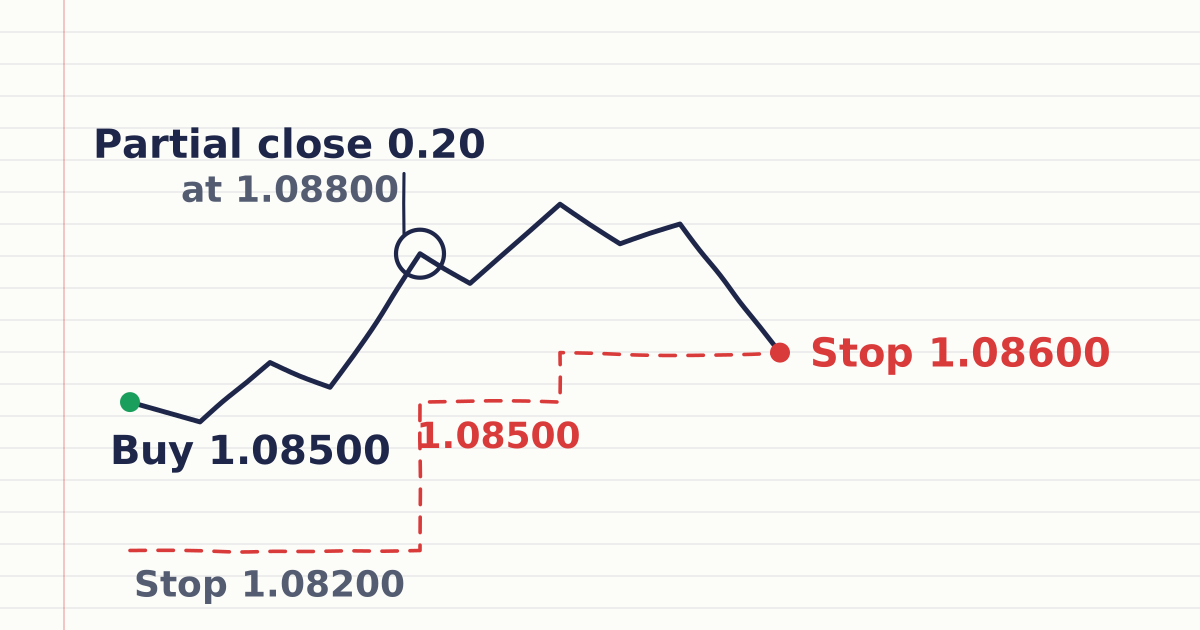
A trailing stop follows price at a fixed distance once the trade is in profit by that distance, so it locks in gains as price rises but never moves back. You buy 0.40 lot of EURUSD at 1.08500, worth $4 per pip (a standard lot is about $10 per pip).
The pip value calculator works out the pip value for other pairs.
- Initial stop loss: 1.08200, 30 pips below entry. Money at risk: 30 × $4 = $120.
- Trailing stop: 300 points, which is 30 pips.
Prices are Bid prices; results are before costs.
| Step | Price | Stop loss |
|---|---|---|
| Entry | 1.08500 | 1.08200, the original stop |
| Profit reaches 30 pips | 1.08800 | 1.08500, trail activates |
| Price rises | 1.08900 | 1.08600 |
| Price falls back to the stop | 1.08600 | Closed: +10 pips × $4 = +$40 |
The other outcome: the price never rises 30 pips and falls to 1.08200. The trail never activated, so the original stop closes the trade: −30 pips × $4 = −$120.
How do you partially close a position in MT5?
To partially close a position in MT5, right-click it in the Trade tab, choose Close Position, type a smaller volume in the Volume field and click Close. The rest of the position stays open, as MetaQuotes' help on executing trades describes.
- Right-click the position and choose Close Position.
- Type the volume to close, for example 0.20 of 0.40.
- Click Close, then check the remaining volume in the Trade tab.
The closing deal must respect the symbol's minimal volume and volume step, listed in its specification in Market Watch. With a 0.01 minimum and step, you can close 0.20 of 0.40, but a 0.01-lot position cannot be split.
On the MT5 mobile app, long-press the position in the Trade tab and choose Close position; MetaQuotes' Android help on managing positions says a position can be closed in full or in part.
In a hedging account the position's stop loss and take profit stay unchanged after a partial close. In a netting account a smaller opposite deal reduces your one position. The netting vs hedging lesson explains both.
Worked example: adding a partial close
Same trade. At 1.08800 you close 0.20 lot: +30 pips × $2 = +$60 before costs. The other 0.20 lot keeps the trailing stop at $2 per pip.
| What the price does next | Full 0.40 lot kept | 0.20 lot closed at 1.08800 |
|---|---|---|
| Never reaches 1.08800; stop hit at 1.08200 | −$120 | −$120 (no partial close happened) |
| Rises to 1.08900, stop hit at 1.08600 | +$40 | +$60 + $20 = +$80 |
| Rises to 1.09500, stop hit at 1.09200 | +$280 | +$60 + $140 = +$200 |
| Reaches 1.08800, then gaps through the 1.08500 stop to 1.08400 | −$40 | +$60 − $20 = +$40 |
A partial close, also called scaling out, banks part of the move and keeps the rest of the position working; the trade-off is a smaller share of any further move.
How does a stop loss differ from a trailing stop?
A fixed stop loss stays at the level you set until you move it, while a trailing stop moves that level behind the price as the trade improves. A partial close is different again: a one-off action that takes part of the position off the market. Each only carries out a decision you made earlier.
| Fixed stop loss | Trailing stop | Partial close | |
|---|---|---|---|
| What it does | Closes the whole position at your level | Moves the stop behind the price | Closes part of the volume now |
| Moves by itself? | No | Yes, only in your favour | No, it is a single action |
| Where it runs in MT5 | Broker's server | Your trading platform | Executed once as a deal |
| Works with MT5 closed? | Yes | No, the last level stays | Not applicable |
| Trade-off | Can fill past your level in a gap | Normal swings can hit it | Gives up part of a further move |
How do you get the most from a trailing stop?
Get the most from a trailing stop by sizing the distance to volatility, keeping MetaTrader 5 running and connected, and knowing that a triggered stop executes as a market order. Set those three right and the trail moves your stop up each time the price makes a new high on a buy, or down on a sell.
- Size to volatility. The US SEC's investor site notes a stop can be activated by a short-term price fluctuation, so set the trail wider than ordinary swings, for example as a multiple of ATR.
- Know the fill. A triggered stop becomes a market order, so in a fast market or after a weekend gap it fills at the next available price, which can be beyond its level.
- Keep the platform on. If MT5 closes, the computer sleeps or the connection drops, the stop holds its last level until MT5 is running and connected again.
Moving a stop to your entry price, the break-even stop, is covered in Module 10, Trade Management.
Try it on demo
On a MetaTrader 5 demo account, open a 0.02-lot EURUSD buy with a 300-point trailing stop. Close 0.01 lot and check the remaining volume. Then close MT5 for a few minutes, reopen it and compare the stop level.
Quick check
- In MetaTrader 5 on a computer, the trailing stop is run by
- You set a 300-point trailing stop on a buy of EURUSD at 1.08500. When does it first move your stop loss?
- The price rises to 1.08900 and then falls. Where is the trailing stop from the question above?
- You hold 0.40 lot at $4 per pip and close 0.20 lot 30 pips in profit. The closed part made
- You close MT5 while a trailing stop is active. What happens?
Frequently asked questions
Does a trailing stop work when MT5 is closed?
No. MetaTrader 5 runs the trailing stop in your platform, not on the server. If the platform is closed or offline, only the last stop loss level it set stays, and it no longer moves.
What is a good trailing stop distance?
A good distance sits outside the instrument's ordinary swings on your timeframe. Many traders set it as a multiple of the average true range, since a trail smaller than a typical candle is easily hit, then check the money at risk.
Can you use a trailing stop on a sell trade?
Yes. On a sell, the trailing stop sits above the price and only moves down as the price falls. If the price rises back to it, the position closes.
Can a trailing stop loss still lose money?
Yes. Until the trade is in profit by the trailing distance, your original stop decides the loss, and a triggered stop can fill worse than its level in a gap.
What does partial close mean in MT5?
Partial close means closing only part of a position's volume, for example 0.20 lot of a 0.40 lot buy, while the rest stays open. In MT5 you type the smaller volume in the Close Position window.
Sources
- MetaQuotes, MetaTrader 5 Help: Basic Principles (Trading Operations), accessed 19 October 2026: the trailing stop is executed in the trading platform rather than on the server and does not work when the platform is off, leaving only the stop loss level it set; it places the stop loss once the profit in points equals or exceeds the set level and moves it only as profit increases; one trailing stop per position; at most one change every 10 seconds per position; each change is logged in the Journal; None and Delete All switch it off; in hedging, a partial close leaves stop loss and take profit unchanged. https://www.metatrader5.com/en/terminal/help/trading/general_concept
- MetaQuotes, MetaTrader 5 Help: Executing Trades, accessed 19 October 2026: a trailing stop is set from the position's context menu in the Trade tab by choosing a distance or Set custom level; a partial close is made from Close Position by entering the volume to close; in netting, an opposite deal of smaller volume reduces the position. https://www.metatrader5.com/en/terminal/help/trading/performing_deals
- MetaQuotes, MetaTrader 5 Android Help: Managing Positions, accessed 19 October 2026: a position is closed from the Trade tab by long-pressing it and choosing Close position, and can be closed in full or in part. https://www.metatrader5.com/en/mobile-trading/android/help/trade/positions_manage
- MetaQuotes, MetaTrader 5 Help: Market Watch, accessed 19 October 2026: the symbol specification lists the minimal volume of a deal and the volume step. https://www.metatrader5.com/en/terminal/help/trading/market_watch
- US Securities and Exchange Commission, Investor.gov, Stop Order, accessed 19 October 2026: a stop order becomes a market order when the stop price is reached, can be activated by a short-term price fluctuation, and may execute at a price different from the stop price in a fast-moving market. https://www.investor.gov/introduction-investing/investing-basics/glossary/stop-order
Practise what you learned
Open an account to use MetaTrader 5. Start on a demo account before risking real money.
Open Account