
Trend Line: How to Draw Trend Lines and Trend Channels
A trend line is a straight line joining two or more swing lows in an uptrend, or swing highs in a downtrend. It maps the slope price is moving at and the points where it has turned, giving traders a reference for entries, stops and breaks.
Module 6 · Lesson 1 of 4
What you'll learn
- What trend lines and trend channels are, the three channel types, and how to draw them.
- Where a line sits on a later candle, and the gap in money.
- How a closing break differs from a wick through the line.
- How to draw both in MetaTrader 5.
What is a trend line?
A trend line is a straight line drawn through two or more swing lows in an uptrend, or two or more swing highs in a downtrend. It shows the slope price has been moving at and where it has turned before. Traders use it to see whether a trend is intact and where the next pullback may meet the line.
Another way to judge how deep a pullback has gone is Fibonacci retracement. MetaQuotes' MetaTrader 5 help describes a trendline as a straight line joining two important minimal or maximal prices. It builds on swings from trends and ranges and works like a sloped version of support and resistance.
Definitions
- Swing low: a candle whose low is below the lows on either side. A swing high is the mirror image.
- Trend channel: a trend line plus a parallel line on the other side of price.
- Closing break: a candle that closes beyond the line.
How do you draw a trend line?
To draw a trend line, pick one timeframe, find two clear swing points in the direction of the trend, and join them with a straight line extended to the right. In an uptrend, join swing lows; in a downtrend, join swing highs. Use swing points already on the chart, never ones you hope will form.
- Choose one timeframe, such as H4 or D1, and stay on it.
- Mark the swing lows (uptrend) or swing highs (downtrend).
- Join the first two clear swing points.
- Check that no candle between them crosses the line; the MetaTrader 5 help says a trendline must not intersect prices between its two points.
- Extend the line right and watch for a third swing on it.
If you have to move a line to make it fit, delete it and start again.
Should you draw a trend line on wicks or candle closes?
You can draw a trend line on wicks, each candle's highest and lowest prices, or on closes, where each candle finished; both are standard methods. Wicks show the full extent of trading. Closes ignore brief spikes. Choose one method and keep it, because mixing them gives different lines.
| Drawn on wicks | Drawn on closes | |
|---|---|---|
| Points used | Each swing's high or low | Each swing's closing price |
| Shows | Where price traded | Where price settled |
| Short spikes, such as news | Move the line | Mostly ignored |
Wicks are explained in candlestick anatomy. This lesson draws on wicks.
How do you calculate where a trend line will be?
A trend line's price on a later candle is its starting price plus its slope times the candles since the start. The slope is the price change between two swing points divided by the number of candles between them. MetaTrader 5 draws this for you, but working it once by hand shows exactly what the line measures.
- Slope = (second swing price − first swing price) ÷ candles between them.
- Line price at candle n = first swing price + slope × (n − first swing candle).
Worked example
A synthetic EURUSD daily uptrend:
| Point | Candle | Price |
|---|---|---|
| Swing low 1 | 10 | 1.0840 |
| Swing low 2 | 20 | 1.0880 |
| Slope | (1.0880 − 1.0840) ÷ 10 = 0.0004, or 4 pips per candle | |
| Swing low 3 | 30 | Line at 1.0840 + 20 × 4 pips = 1.0920; the low touches it |
| Candle 40 | 40 | Line at 1.0960; low 1.0948, close 1.0972 |
| Candle 42 | 42 | Line at 1.0968; close 1.0958 |
On candle 40, the wick dips 12 pips below the line but the candle closes 12 pips above it: no closing break. On candle 42, the close is 10 pips below: the first closing break.
In money, the 12-pip gap on candle 40: for 0.10 lot of EURUSD in a US dollar account, one pip is $1, so the gap is $12. See lots, pips and pip value or our guide to forex lot sizes; the pip value calculator handles other sizes.
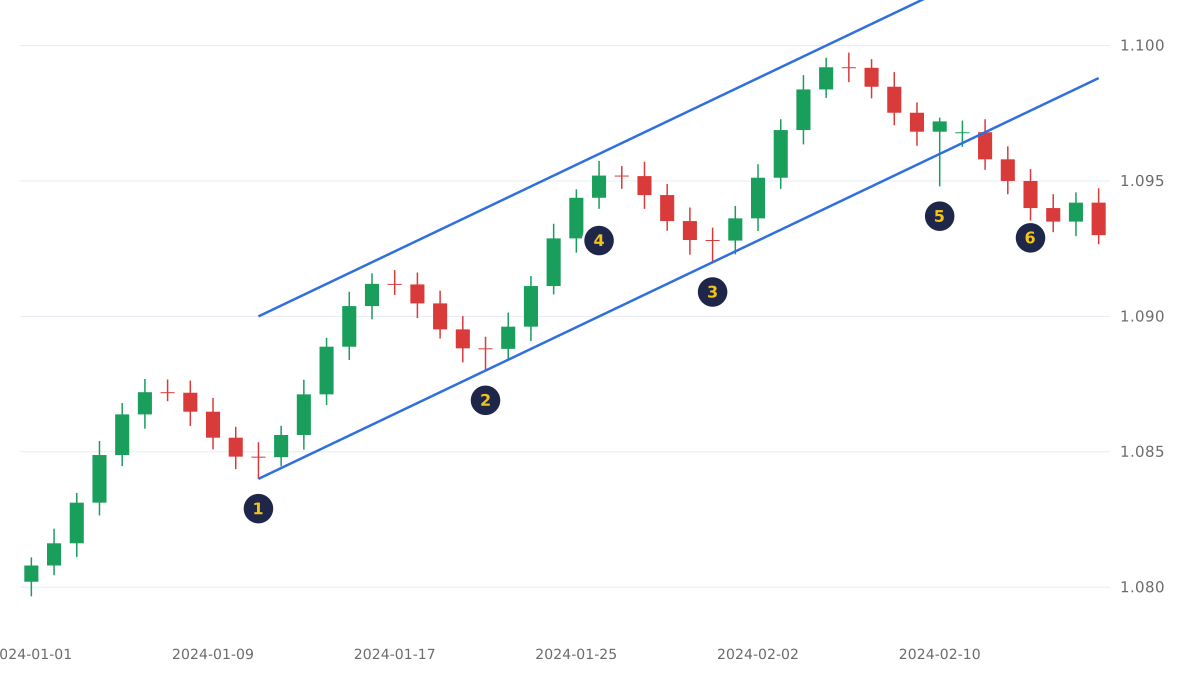
- Markers 1 to 3: swing lows at 1.0840, 1.0880 and 1.0920, ten candles apart.
- Marker 4: the parallel channel line, 60 pips above, near the swing highs.
- Marker 5: a wick pierces the line, but the candle closes above it.
- Marker 6: candles now close below the line, here 36 pips under.
What makes a trend line valid?
Chart readers usually call a trend line valid once two swing points form it and a third touches it, and they rate it higher when it spans more time on a higher timeframe. A valid line is one most traders would draw the same way, which is what makes it a shared reference point on the chart.
- Touches. Any two points make a line; chart readers look for a third.
- Length. A line spanning months on D1 covers more history than hours on M15.
- Slope. A very steep line is left behind by any slowdown.
What is a trend channel?
A trend channel is a trend line plus a second line parallel to it on the other side of price, so both share the same slope. In an uptrend, the main line runs through the swing lows and the parallel line near the swing highs.
Price spends much of its time between the two lines, which gives traders an upper and a lower reference for the trend. Channels are named by their slope:
| Channel type | Both lines | Swing points joined |
|---|---|---|
| Ascending | Rise | Higher lows and higher highs |
| Descending | Fall | Lower highs and lower lows |
| Horizontal | Flat | Similar lows and similar highs, a range |
In the worked example, the channel line sits 60 pips above the trend line, so on candle 40 it is at 1.0960 + 0.0060 = 1.1020.
MetaTrader 5 calls this object the Equidistant Channel: two parallel trendlines that can be extended left or right and filled with colour.
| Horizontal support or resistance | Trend line | Trend channel | |
|---|---|---|---|
| Shape | Flat line or zone | Sloped line | Two parallel sloped lines |
| MetaTrader 5 object | Horizontal Line or Rectangle | Trendline | Equidistant Channel |
When is a trend line broken or redrawn?
A trend line is broken on a closing basis when a candle closes beyond it, not when a wick only reaches through. A closing break tells you the slope that was holding has stopped holding, which is the cue to reassess the trend and any position built on it.
After a break, leave the old line in place rather than nudging it to fit. If two new swing lows form at a flatter slope, draw a new line through them: a new description, not a repair.
Chart readers often watch for a retest: price coming back to a broken line from the other side. A broken uptrend line can then act like sloped resistance, the same role reversal seen with horizontal levels. Not every break retests, so traders who wait for one accept missing some moves. Breakouts and false breaks are covered later in this module.
How do you draw a trendline and a channel in MetaTrader 5?
In MetaTrader 5, add a trendline or equidistant channel from the Insert menu or the Line Studies toolbar, then click and drag between swing points. The MetaTrader 5 help on analytical objects notes that objects are plotted manually and can be edited afterwards.
- Choose Trendline from the Insert menu or the Line Studies toolbar.
- Click the first swing low, hold and drag to the second, then release.
- Right-click the line, choose Properties and switch on Ray Right so it extends into new candles.
- For a channel, choose Equidistant Channel the same way, draw it along the trend line, then drag its second line to the swing highs.
What are common trend line mistakes?
The most common trend line mistakes are forcing a line to fit, ignoring gaps and judging slope by eye at different zoom levels. Skilled traders draw from clear swings, measure slope in pips per candle and read the line together with horizontal support, resistance and the swing structure around it.
- Draw from clear swings. A line moved until it fits stops describing the market; if it needs forcing, start again.
- Plan for gaps. After news or a weekend, price can open beyond a line, so a stop near the line can fill past it.
- Measure slope in pips per candle. Zooming changes a line's angle on screen but not its slope in pips.
Sizing a trade around a trend line stop is covered in Module 5, Risk Management.
Try it on demo
On a MetaTrader 5 demo account, open D1 charts for EURUSD and gold. Draw a trendline through two existing swing points with Ray Right on, then add an equidistant channel. Note the line's price today and check after a week whether any candle closed beyond it.
This lesson opens Technical Analysis I: Price Structure.
Quick check
- In an uptrend, a trend line is drawn through
- Swing lows at 1.0840 and 1.0880 are 10 candles apart. The slope is
- A wick dips below an uptrend line but the candle closes above it. On a closing basis this is
- A trend channel adds
- An uptrend line breaks on a close. This tells you
Frequently asked questions
How many points do you need to draw a trend line?
You need two swing points to draw a trend line, and many chart readers look for a third touch before calling it valid, because any two points make a line.
Is a trend line support or resistance?
In a descriptive sense, yes: an uptrend line works like sloped support and a downtrend line like sloped resistance. A candle close beyond either one marks a break.
Do you draw trend lines on the body or the wick?
Either works if you use the same method every time. Wicks show the full range traded; closes ignore brief spikes.
What happens when a trend line breaks?
When a candle closes beyond a trend line, the slope that was holding has stopped holding. Price can then reverse, move sideways or resume, so traders treat a break as the cue to reassess and let the next swings show the new direction.
Sources
- MetaQuotes, MetaTrader 5 Help: Trendline, accessed 19 October 2026: a trendline joins two important minimal or maximal prices; it must not intersect other prices between its two points; Ray Right and Ray Left extend it. https://www.metatrader5.com/en/terminal/help/objects/lines/trend_line
- MetaQuotes, MetaTrader 5 Help: Equidistant Channel, accessed 19 October 2026: two parallel trendlines joining extreme prices, with Ray Right, Ray Left and Fill settings. https://www.metatrader5.com/en/terminal/help/objects/channels/equidistant_channel
- MetaQuotes, MetaTrader 5 Help: Analytical Objects, accessed 19 October 2026: objects are added from the Insert menu or the Line Studies toolbar, are plotted manually, can be edited through Properties and removed with the context menu. https://www.metatrader5.com/en/terminal/help/charts_analysis/objects
Practise what you learned
Open an account to use MetaTrader 5. Start on a demo account before risking real money.
Open Account