
What Is Break Even in Forex? Break-Even Price and Break-Even Stops
Break even in forex is the price at which closing a trade gives a result of zero after the spread, commission and swap are counted. A break-even stop is a stop loss moved to that price, or to the entry, once the trade has moved in your favour.
Module 10 · Lesson 2 of 5
What you'll learn
- What break even in forex means, and why it differs from your entry price.
- How to calculate the break-even price after spread, commission and swap.
- How to move your stop loss to break even in MetaTrader 5.
- How gaps and slippage affect where a break-even stop fills.
This lesson is part of the Trade Management module.
What is break even in forex?
Break even in forex is the price at which closing a trade gives a result of zero after all its costs: the spread, any commission and any swap. On a buy, that price sits a little above the entry you paid. On a sell, it sits a little below. Closing exactly at the entry price usually leaves a small loss.
That small loss comes from costs that do not depend on where the price goes: the spread paid on opening, commission per trade, and swap for each night past the daily rollover. If these are new, read the spread, commission and swap lesson first.
Definitions
- Break-even price: the closing price at which the trade's net result is zero.
- Break-even stop: a stop loss moved to the entry price or to the break-even price once the trade has moved in your favour.
- Slippage: the difference between your stop level and the price you actually get.
- Gap: a jump in price with no trading in between, often after a weekend or major news.
How do you calculate the break-even price?
To calculate the break-even price of a buy, add your costs in pips to the price you paid. Costs in pips = (commission + swap) ÷ pip value. For a sell, subtract them from the price you sold at. The spread is already inside your entry price, because you buy at the Ask and close at the Bid.
The MetaTrader 5 help on trading principles states that stops on buys are checked against the Bid and on sells against the Ask.
- Break-even price (buy) = entry price + (commission + swap) ÷ pip value × pip size
- Break-even price (sell) = entry price − (commission + swap) ÷ pip value × pip size
The pip size is 0.0001 on most currency pairs. The pip value calculator gives the pip value; our guide to forex lot sizes explains lots.
Worked example
Synthetic figures. You buy 0.20 lot of EURUSD at 1.08500 Ask (Bid 1.08488, a 1.2-pip spread). A pip is worth about $2. Assume a $7 round-turn commission for this trade and a same-day close, so no swap.
- Costs in pips: $7 ÷ $2 per pip = 3.5 pips.
- Break-even price: 1.08500 + 0.00035 = 1.08535 on the Bid.
- Spread check: the Bid starts at 1.08488, so it must rise 4.7 pips (1.2 for the spread, 3.5 for commission) to reach zero.
- Swap check: held one night with an assumed swap of −$1.00, add 0.5 pip, giving 1.08540.
Your original stop was at 1.08200, 30 pips below entry. The price rises to 1.08800 and you move the stop. Each level, if hit and filled exactly:
| Stop level hit | Price result | Commission | Net result |
|---|---|---|---|
| 1.08200 (original stop) | −30 pips × $2 = −$60 | −$7 | −$67 |
| 1.08500 (entry) | $0 | −$7 | −$7 |
| 1.08535 (break-even price) | +3.5 pips × $2 = +$7 | −$7 | $0 |
Moving the stop to the entry turns a planned $67 loss into a $7 loss; moving it to the break-even price takes it to $0.
Break-even with more than one entry
If you add to a trade, use the volume-weighted average entry: (lots₁ × price₁ + lots₂ × price₂) ÷ total lots. Buying 0.10 lot at 1.08500 and 0.10 lot at 1.08600 gives an average of 1.08550, before costs. Adding to positions is covered in the scaling in and out lesson.
How do you move your stop loss to break even in MT5?
To move your stop loss to break even in MetaTrader 5, right-click the open position in the Trade tab, choose Modify or Delete, type the new price in the Stop Loss field and confirm with the Modify button. You can also drag the stop line on the chart. The MetaTrader 5 help on executing trades describes both.
- Open the Toolbox and select the Trade tab.
- Right-click the position and choose Modify or Delete.
- In the Stop Loss field, type the entry price or your break-even price, such as 1.08535 in the example.
- Click Modify. The button stays inactive until the levels are valid.
Setting your first stop loss is covered in the stop loss and take profit lesson.
When do traders move a stop to break even?
Traders usually move a stop to break even after the price does something their plan named in advance. Common triggers: a move in their favour equal to the original stop distance (often called 1:1), a break of a nearby support or resistance level, or a first target where part of the position is closed.
Others decide by time, such as before a weekend or major news. A trigger written into the plan before the trade opens is easier to apply consistently than a move made in the moment, out of worry about losing an open gain. Writing such rules is covered later in this module.
What are the pros and cons of a break-even stop?
The main pro of a break-even stop is fewer full losses; the main con is more trades closed before their planned move develops. A stop at the entry sits close to the current price. Ordinary back-and-forth movement can reach it and close the trade at about zero, and then the price can go on to the original target without you.
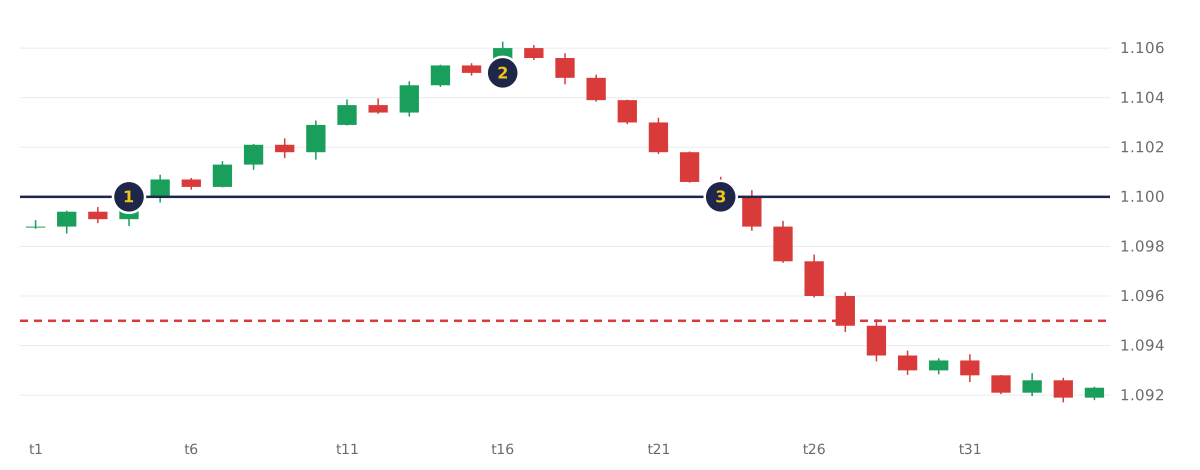
- Entry at 1.1000, original stop at 1.0950 (dashed line).
- Price rises to about 1.1050; the stop moves to the entry.
- Price reverses. The trade closes near the entry, a small loss after costs, not the full loss at 1.0950.
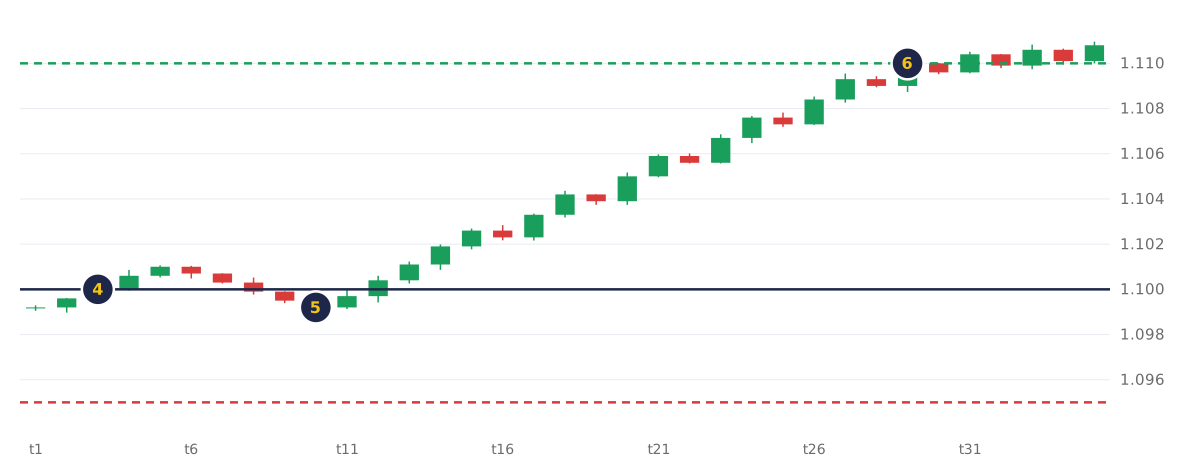
- Entry at 1.1000; the stop moves to the entry when price is only about 10 pips higher.
- A pullback to about 1.0990 hits it. The original 1.0950 stop would have held.
- Price then reaches the 1.1100 target, without the trade.
How do fixed, break-even and trailing stops compare?
A fixed stop stays where you set it, a break-even stop is moved once to the entry or break-even price, and a trailing stop follows the price at a set distance. Each changes when the trade can close, and each fills at the next available price once triggered.
| Fixed stop | Break-even stop | Trailing stop | |
|---|---|---|---|
| Where it sits | Where it was set at opening | Moved once to entry or break-even | Follows the price at a set distance |
| Who moves it | No one | You, once | The platform, under your settings |
| Loss if hit at its level | The full planned loss | About zero, or a small loss from costs | Depends on how far it has moved |
| Closed by ordinary pullbacks | Least likely | More likely, as it sits closer to price | Depends on the distance |
| Can it slip in a gap? | Yes | Yes | Yes |
Trailing stops and partial closes are covered in the trailing stop and partial close lesson.
What happens to a break-even stop in a gap?
In a gap, a break-even stop fills at the first available price past its level, because it is a normal stop: once triggered it closes at the next available price. Investor.gov explains that a stop order becomes a market order when the stop price is reached, and the price you get may differ, especially in a fast-moving market.
In the worked example, your stop sits at the 1.08500 entry. The market reopens after the weekend with the Bid at 1.08480, so the stop fills there:
- Price result: 1.08480 − 1.08500 = −2 pips × $2 = −$4.
- Commission: −$7.
- Net result: −$11, not zero.
A larger gap fills further away; how traders plan for gaps and slippage around news is covered later in this module. A break-even stop manages one position, and the combined risk of several open trades is covered in the correlation lesson.
Common mistakes:
- Moving the stop to the entry and forgetting that commission and swap still count.
- Moving it so early that normal price swings close the trade, as in the second chart above.
- Treating the break-even level as a fixed exit price, when the stop fills at the next available price.
Try it on demo
On a MetaTrader 5 demo account, open a 0.01-lot buy on EURUSD with a stop 20 pips below. Note the entry, commission and pip value, and calculate your break-even price. If the trade moves 20 pips your way, move the stop to that price with Modify or Delete, then check the closed result in the History tab.
Quick check
- The break-even price of a buy trade is
- You buy 0.20 lot at 1.08500 at $2 per pip and pay $7 commission. The break-even price is
- In MetaTrader 5, the stop loss on a buy position is checked against
- Your stop sits at the 1.08500 entry, but the market gaps and fills you at 1.08480. With $2 per pip and $7 commission, the result is
- Moving a stop to break even early usually means
Frequently asked questions
Is moving your stop loss to break even a good idea?
It suits a plan that values fewer full losses over catching every move. It cuts the loss if the trade reverses, but closes more trades on ordinary pullbacks before their target. Skilled traders name the trigger in advance and test it on demo.
When should you move your stop loss to break even?
Traders usually move it at a trigger set in their plan: a move in their favour equal to the original stop distance (1:1), a break of a nearby support or resistance level, or a first target where part of the position is closed.
Why did my break-even stop close at a loss?
Usually because the stop sat at the entry, not the break-even price, so commission and swap were not covered. Or a gap or fast market filled it past its level.
Sources
- MetaQuotes, MetaTrader 5 Help: Basic Principles, accessed 19 October 2026: a stop loss is used to minimise losses; stop loss and take profit on long positions are checked against the Bid price and on short positions against the Ask; activation closes the entire position. https://www.metatrader5.com/en/terminal/help/trading/general_concept
- MetaQuotes, MetaTrader 5 Help: Executing Trades, accessed 19 October 2026: right-click a position in the Trade tab and choose Modify or Delete, enter the Stop Loss and Take Profit and click Modify, which stays inactive until the levels are set correctly; with Show trade levels enabled, levels can be dragged on the chart and the modification window opens. https://www.metatrader5.com/en/terminal/help/trading/performing_deals
- US Securities and Exchange Commission, Investor.gov, Stop Order, accessed 19 October 2026: when the stop price is reached a stop order becomes a market order; it can be activated by a short-term price fluctuation; and the execution price may differ from the stop price, especially in a fast-moving market. https://www.investor.gov/introduction-investing/investing-basics/glossary/stop-order
Practise what you learned
Open an account to use MetaTrader 5. Start on a demo account before risking real money.
Open Account